Ned’s Head

Lincoln asked me to play a game called “What’s In Ned’s Head” with him this afternoon. I had no idea what I was getting myself into when I said, “Sure”.

The game includes a set of cards, various items (spiders, visiting space man, bird poop) that are placed in Ned’s head which is made of soft flannel. You can reach into Ned’s head through openings in the ears and mouth. The openings are big enough to get a arm through but not big enough to see much. A card is drawn, hands go into the head until someone successfully retrieves the item depicted on the card.

Here’s Lincoln with Ned after his big win

DSC_0909

I am a rookie Ned’s Head player and I got absolutely schooled today by my 4-year old. He pulled the dirty diaper, ear wax and pea brain before I knew what hit me. I was 0 for 3 where the mercy rule was enacted.

I learned two things today:

  1. To a 4-year old, the grosser the better.
  2. “Bird Poop” and “Ned’s Lost Lunch” are not the same thing.

Now I know. I will be ready next time.

Technorati Tags: , ,

Pwned by Costco

I visited Costco recently with Kim. Before we went into the store I asked her what we needed and she said, shredded cheese, uncooked tortillas and something else I don’t remember now. It’s all blur.

We entered the store and began pushing a huge shopping cart around the store, finding all sorts of things we needed that were not part of the original three items we came for including Boston Legal season 3, chicken nuggets shaped like dinosaurs, and special $18 eyed drops.

After a while, I started nudging Kim towards the check out but we still needed some AA batteries. So we walked over to the electronics section and looked around. No batteries. Just giant stacks of iPods and flash drives. We headed over to the office supplies section. I didn’t realize shavers and toothbrushes were part of office supplies but I could overlook this pairing if I could just locate the dang batteries!

We continued walking towards the rear of the store, past the books, chocolate display and Christmas serving dishes until I noticed the batteries on an end cap across from the tires. I tossed a 36 pack of AAs in the cart at a cost of just over twelve bucks. Mission accomplished. 

Costco works for people who have a lot of time to spend shopping. Or those who enjoy going down every aisle. That how our 3 item shopping trip turned into a 30 item one. One thing always makes me laugh at the check out: We could have 20 small items coming down the conveyor belt, yet we’re always asked, “Would you like a box?”. Just once, I’m tempted to pass on the box and see how the many items I can stuff down my shirt and pants as I try to get by the receipt checker.

But for now, I need to rest from lugging that 48 pack of bottled water in and out of my trunk.

Technorati Tags:

Suggestions for first time bloggers

Recently, my mother-in-law and friend started blogging. I encouraged both of them to blog because I don’t get to see either very often and both are very good writers. I figured both would create interesting blogs that I and others would enjoy reading.

Both asked me questions about what it takes to get started. I don’t consider myself a blogging pro by any means but I’ve been doing it enough years now to have an idea of what has worked for me and what might work for others.

Here are a few questions friends or family or coworkers have asked me about blogging and my answers:

How do I get started?

I usually tell people to read a few blogs for a while before jumping into the fray. This is especially important for those who have been told to start a “company blog”. It’s worthwhile spending some time checking out different blogs before starting your own.

So I checked out some blogs, what’s next?

I’m a big believer in simplicity. So unless they already have a website, I’ll usually suggest taking a look at Blogger or Windows Live Spaces. Both make it very easy to start a blog. There’s very little to get in the way of writing which is what a blog is about anyway. I find Blogger a little easier to use but Spaces feels a bit more flexible and powerful. And, if down the road, they decide to move to WordPress, they’ll be able to easily migrate content.

If you want even more control over your blog but want someone else to host it, take a look at WordPress.com or Typepad. Both offer a hosted blog solution that many have come to rely on. Robert Scoble hosts his popular blog at WordPress.com and Seth Godin relies on Typepad to handle his. Both are proven platforms with very responsive support communities.

But what if I want to host my own blog?

I’m hesitant to suggest this option mostly because if they run into problems I become their technical support person of choice. The installation isn’t for the faint of heart if you’ve not familiar with at least some basic Linux/PHP/CSS/MySQL. But I digress. If I know someone is tech savvy I’ll suggest they take a look at WordPress.org or Moveable Type. I’ve tried a number of other options but these are the big two. I’ve been using WordPress for about five years now and really enjoy it. There are tons of themes and plug-ins available for it and it has such a strong community that any problems I run into are answered quickly. And tools like Windows Live Writer have vastly improved the writing/posting process for hosted blogs.

Choosing the right blogging platform is important but it’s not the most important decision. Creating interesting content is the most important. If you are interesting people will come. And they will return. New bloggers can easily get bogged down with all the themes, plugins, widgets, blogrolls, and the like while they ignore writing. It’s not about where your blog is hosted, your hip theme or page full of widgets…it’s the quality of your writing that matters most.

OK, put the Flickr widget down and start writing. 🙂

Walled Garden

I was talking with a friend today and asked him how a former coworker of ours was doing. My friend mentioned that he was doing well but went to work for a company that has a strict internet usage policy: No personal email, no instant messaging. I assume no Twitter or blogging either.

I’m lucky to work for a company that has a liberal internet usage policy. Their focus is on getting the job done and allowing each employee to police himself when it comes to outside communication. We are trusted.

I wonder what a company hopes to achieve by removing access to instant messaging and the like? What it tells me is they don’t trust their employees with personal time management. Policy like this breeds mistrust.

I once worked for a company that didn’t allow instant messaging even though we had employees in several cities working on the same projects. When used properly IM can be a boost to productivity over the phone or email. But the IT manager at the time didn’t use IM so nobody else would either.

I cannot imagine working for a company that bans IM or blogging.

The ultra dual monitor utility

I’ve been looking for the dual monitor utility that does exactly what I want it to do and this weekend I found it. It’s called Ultramon and I now consider it a must have utility for dual monitor users. It will be one of the first programs I install when I rebuild my computer every few weeks….oh wait…I’m not running Vista anymore. 🙂

I love how it allows me to configure each monitor independently. As you can see, I’m able to use a picture as wallpaper on each monitor. But the killer feature I’ve been looking for is how it manages open programs in the task bar. An open program will show up on that monitor’s task bar. You can even move program to the other monitor from the task bar.

screen_2007-09-16 21.43.56

In short, Ultramon does what I’ve been looking for. It has a ton of other nifty features. The only downside? It’s not freeware.

Here is an overview of its best features

Link to download 30 day trial version

Link to more in depth review from Digital Lifestyles

Technorati Tags: ,

Tweetr 2 freaks out

I used to recommend Tweetr to my friends who were getting started with Twitter. But ever since version 2 arrived, I’ve been telling them to look elsewhere. What started out as a good program has become less stable over time.

The screen below presents itself at least half a dozen times a day. I’ve experienced the same problem on my work computer. In order to get it working again, I press the OK button a few times and it goes back to normal. Sometimes the OK button positions itself in the far upper left corner where it can barely be reached.

What other Windows based Twitter apps should I consider? This is getting old.

screen_2007-09-16 20.11.06

Technorati Tags: ,

Motorola Q: Three month review

I’ve had my black Motorola Q for a few months and figured I’d revisit the review I wrote a while back. You can read my first impressions here, but keep in mind I’d only had the phone a few days.

Looking back to that first review the positive traits pretty much match up to my impressions today. The screen is quite nice, it’s relatively thin and easy to handle and it works well as an email platform with Exchange server report. Voice quality isn’t bad either.

moto-q-black-1 But the Q has one major problem I can’t overstate: it’s a terrible phone.

When people ask me how I like the Q I tell them that it makes a very good email and text device. It’s not bad at basic web browsing either. But if you’re looking for a great phone, this isn’t it.

What makes it a bad phone? The keys are just to dang small which leads to making numerous typing mistakes. I assumed the mistakes would decrease they longer I had the phone. Not a chance. With my old Motorola E815, I could input the numbers by feel. But the Q requires your utmost attention. And even then you’re likely to make mistakes. It’s an exercise in frustration. If the person you want to call is in your contact list or has called recently, it’s takes pressing a few buttons to make the call. But having to input the number manually is maddening.

I use the data features a lot more than I do the phone. Due mostly to my line of work, email is the preferred method of communication and the Q works quite well for that. I’m also to able to read my RSS feeds through Bloglines which is nice.

One other reason I stick with the Q is that someone at Microsoft wrote a fantastic traffic application. I don’t believe it’s available publicly so I can’t link to a download (here’s what it looks like), but it’s the best traffic application I’ve seen on a smartphone. Living about 25 mile south of Seattle and commuting into Redmond each day, I’ve come to rely on this nifty little application. I know there are web based product with similar functionality, but I like not having to launch my browser each time I want traffic updates.

So I can’t recommend the Q primarily as a phone. If you’re a data first, phone second kind of person, it may fit your needs though. If that’s the case it would help to have thin, nimble fingers.

Google vs. Microsoft Live Search Part 1

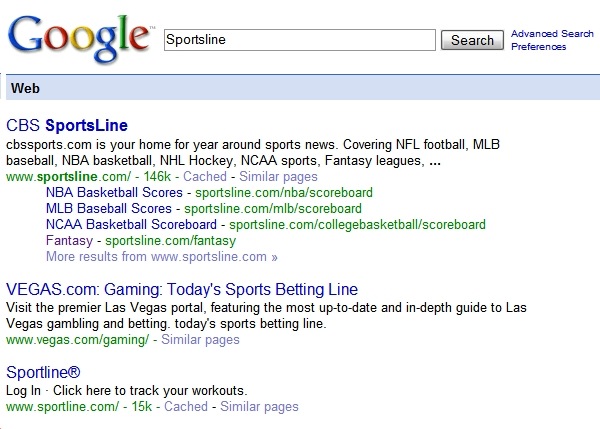
As more and more pages flood the net, it’s getting increasing difficult to find relevant search results within the first few results. I don’t have much patience when it comes to search. I expect to find what I’m after in the first 2 or 3 results or I try something else. I was reminded of this when I did a search this morning. I was looking for the Fantasy area of the Sportsline website so I went to Google and typed “Sportsline” and here are the first three results:

sportsline1

As you can see, Google organizes the different departments under the main search topic. In this case, it’s easy to see “Fantasy” listed under CBS Sportsline giving me the result I’m after.

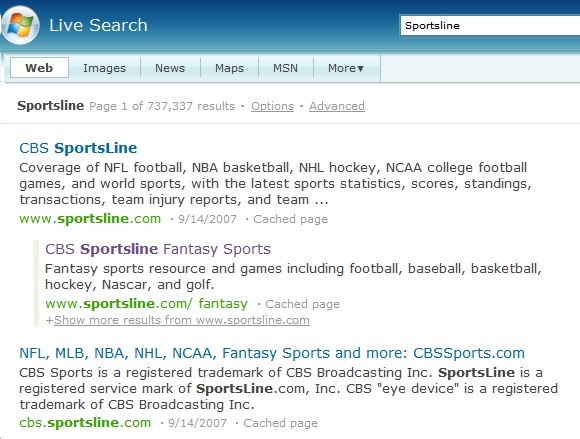
Here are the same results using Microsoft Live Search:

live1

You’ll notice that the first three results all go to the same site, CBS Sportsline, but the results are not as helpful at getting me to the right area. In fact, they are a bit confusing. It appears that the 2nd result is related to the first result which it is. Yet the third result looks like it should an entirely different website which it isn’t.

Google does a better job at getting me to the result faster. It’s similar to looking at a directory at a department store: Once I’m in the store, I go to the kids shoes or men’s department. If know the parent site, Google does a better job at getting me to the right area/department. Both do a good job at getting me to the parent site but so did Web Crawler and Alta Vista. Google has raised the stakes again.

Take a look at the following results and you’ll see what I mean:

  1. Search for “ESPN” at Google and Live – Google organizes the major areas (MLB, NBA, NFL) . Live keeps you searching down the list of results.
  2. Search for “Delta Airlines” at Google and Live – Google organizes Delta links under the main search term making it easy to navigate right to Flight schedules or Reservations. Live gets the main Delta site correct but isn’t much help after that. I’d have to click on that result and the click through the Delta site to get to the area I’m after.
  3. Search for “Nordstrom” at Google and Live – Both place ads up top but Live places 3 and Google places just one. This one isn’t even close. Look how well organized the Google results are compared to Live’s results where the first result links to a Nordstrom store in San Francisco. Huh? I live in Seattle. One thing I do like about the results on Live is the “related searches” selection on the far right.

Google generally does a better job at getting me to the result I’m after faster than anything else. Maybe this has something to do with the experience Google has gathered over the years. It has an uncanny way of determining what I’m after better than anything else.

Microsoft Live has a ways to go before I’d consider using it full time. Just getting me the parent site isn’t enough anymore.

5 things I’ve learned as a manager

My first job out of college was manager of a retail store. I spent half the time managing 10 employees an the other half traveling to gift shows purchasing product to sell in my store. It didn’t take long to figure out that I was a pretty good buyer, but terrible manager.

Over the years I learned from that experience and have been given the opportunity to figure out what my management style is and attempt to improve upon those early failures.

In my current job I manage a group of 35 technicians. But in reality, I’m more of a “sounding board” than anything else. Here is a list of things I’ve learned that have helped me over the years:

  1. Listen – One of the hardest things to do is also the most important. It’s hard to bite my tongue at times but it’s usually the best thing to do. Back to the sounding board description: I’ve found that many people just need someone to listen to them as they work out the problem in real time. If you jump in with a solution, you’ve robbed them of a great opportunity
  2. Get Out – What I mean is get out of your office. If you sit behind a desk with the door partially closed, you’re not accessible. In fact, if you can sit near your team and give the office to someone else, do it! You won’t believe how much more you’ll learn about your team if you do. Go to lunch, shoot hoops, play a game or anything else that lower the barriers. I enjoy playing Xbox games with the techs even though I get my butt kicked every time. If you’re approachable during the good times, you stand a better chance of hearing about the problems in a timely fashion when there’s still time to react. 
  3. Be a Good Friend – I’ve never understood managers who don’t believe they should be a friend to their employees. This doesn’t mean you have to get together to watch the Survivor finale, but it does mean that you treat them kindly like you would a friend. It means giving them honest feedback like your best friends do. It means going to bat for them when needed and looking out for their well being and spending time with them. I’ve learned it’s ok to ask for their advice and solicit feedback on important decisions. My boss calls this “putting skin in the game”.
  4. Be Kind – It’s easy to be kind at the Christmas party or company meeting. Or right after anonymous surveys were sent out to gather feedback on the management team. But how do you treat your employees on Monday morning when you’re tired and all you want to do is finish an email? Do you make meeting with them a priority? I’ve found that it’s the small gestures that matter the most. The simple hello or smile in the hallway. The quick email sending kudos for a job well done. Those carry far more weight than any pep talk you’ll ever give.
  5. Admit Mistakes – This is a tough one. But you’re going to make mistakes as a manager and it’s better to admit, fix and move on. I’ve found my team to be a lot more forgiving when I admit to a mistake rather than acting like it didn’t happen. Acting like nothing happened just perpetuates the notion that management is detached or just plain clueless. Or both.

    I still have a lot to learn and continue to make my share of mistakes. But I’m learning from those mistakes and watching how others manage to see what I can glean. It’s an ongoing learning process, but one that’s made more enjoyable because of 35 hard working, fun and eccentric individuals.

    DilbertTeeShirt

Technorati Tags: