I’ll know I’ve arrived when…

Some people say they will have arrived when they are able to buy a Mercedes Benz. Or a vacation house in Park City. Or a Steinway Grand Piano.

Not me. My goals are little less lofty.

I want my very own pinball machine. Preferably a basement full of half a dozen pinball machines. When I’m able to drop $4500 on a pinball machine, I’ll know I’ve arrived. 

pinball

Windows Live Writer Review

Do you spend as much time formatting your blog posts as you actually writing them? WordPress is a fantastic blogging platform, but the included editor can be frustrating for those who would rather spend their time writing than mucking with formatting tags.

Over the past week I’ve spent a lot more time writing than mucking. This is due to the discovery of Windows Live Writer. Here are a few of the things I like the most:

  1. Setup – Getting up and running was a cinch. All I had to do was install the program, give it my blog address along with my username and password and I was off and running. Painless.
  2. Web Layout View – This pulls in the theme from your blog so that when you write, it looks just like your post will look. This lets me get the formatting down exactly how I want.
  3. Image Handling – I used to spend a lot of time trying to format my images. So much so that I’d usually give up or just post a standard, inline picture and call it good. Now I can create posts like this one utilizing multiple imagines that take no time at all. The on-the-fly image resizing is just plain slick.
  4. Performance – I don’t know how they did, but this is the first 3rd party editor that doesn’t upload as a snail’s pace. It posts content very quickly, even those with images.

There is a lot more to like in addition to the above such as the ability to insert tags, video, and maps from Windows Search Maps. The best compliment I can give any software is that it just works the way I work. And that’s how it is with Live Writer. It’s easy to use yet includes the advanced features more experienced bloggers have to expect. It’s actually fun to use.

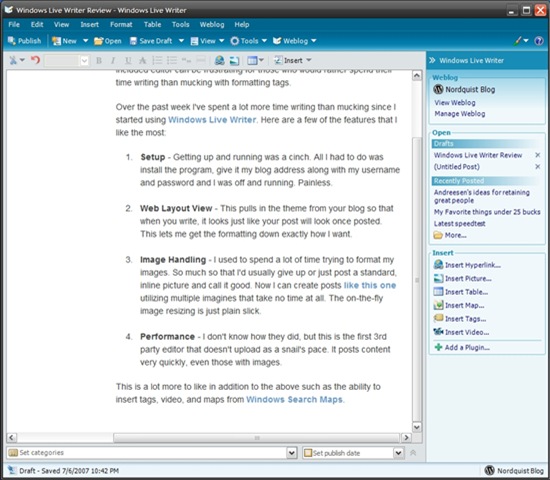
screen1Here is the main area of Live Writer. Basic formatting tools can be found from the top while more advanced formatting and content tools are positioned off to the right. Microsoft has raised the bar on what we should expect from an editor.


Andreesen’s ideas for retaining great people

I came across Mark Andreesen’s post tonight and he brings up some excellent suggestions for retaining the best employees.

THINGS TO DO

Focus: In a technology company, focus on retaining the great architects and managers — the people who are the magnets for retaining other great people and hiring more great people…You have to retain the magnets — or at least a critical mass of them — because without them, you’re going to lose everyone else.

Promote Your Best People: especially into the jobs vacated by the more senior of the people you just fired — and give them very interesting challenges.

THINGS TO AVOID

Don’t create a new group or organization within your company whose job is “innovation”:

This takes various forms, but it happens reasonably often when a big company gets into product trouble, and it’s hugely damaging.

First, you send the terrible message to the rest of the organization that they’re not supposed to innovate. Second, you send the terrible message to the rest of the organization that you think they’re the B team.

The last company I worked for did exactly what Mark says to avoid, and it was very destructive.

It’s tough to get excited about much when you’ve been relegated to the B Team. As tempting as it sounds to only include a chosen few, it’s best to widen the input and brain-storming meetings to anyone, regardless of title, to those who show an interest.

innovation

Mahalo – The human powered search engine

Say what you will about Jason Calacanis, but I believe he’s created a winner in Mahalo, a human powered search engine where guides filter through the results and provide links to only the best results.

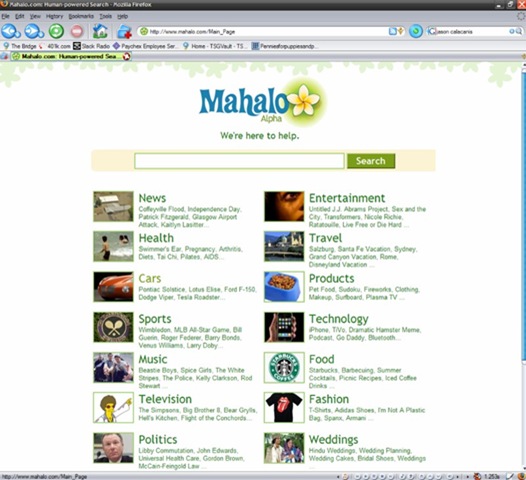
mahaloMahalo is like getting a single page of Google results that are all helpful. For example, when I click on BMW 3 Series I get a single page of relevant results. Compare this with Google’s results for the same search term. Google’s results aren’t bad, but navigate past the first page and things get sketchy.

Mahalo doesn’t yet have the reach of Google nor will it ever. Today, you won’t find very obscure topics or products (like Grado headphones) but they have covered a lot of ground in only a short time. And even when Mahalo doesn’t cover a topic, it presents you with results from Google. This is very helpful.

I find myself using Mahalo more and more because it doesn’t flood me with useless information. I am able to drill down to the most relevant details very quickly without a lot of trial and error. And it will only get better as more pages come online.

Technorati Tags: , ,

Nintendo Wii Sighting

Last night is the first time I’ve seen a shelf full of Nintendo Wii. Granted it was a small shelf that held only 4 boxes. But I was surprised to see a Wii in the wild and asked the clerk if they were just display boxes. He said, no, they had a shipment arrive this morning. He didn’t know how many arrived but they had four left at the Covington, WA store.

Technorati Tags: ,

Things in my Life

Things that just work:

  1. DirecTivo
  2. WordPress
  3. Windows Live Writer
  4. Nikon D40

Things that work most of the time:popcorn

  1. iPod Video
  2. Motorola Q
  3. Qwest DSL
  4. Microwave Popcorn

Things that sometimes work:

  1. VOIP Phones
  2. NBA Lottery
  3. iTunes
  4. BitTorrent

 Things that cause more frustration than help:

  1. Self Checkout
  2. Windows Vista
  3. ActiveSync
  4. Sirius Satellite Radio

Geek Squad for Cell phones?

I am enjoying my Motorola Q phone from Verizon. The sync with Windows Exchange just works as does Mobile Messenger. It’s a good phone, good IM device, and great email/SMS device. I also run a little application that shows a color coded map of the Seattle area traffic which helps plan my route into work. Even the web browsing isn’t bad as I’m able to read my RSS feeds in Bloglines quite well.

Now that I’ve got it setup, the Q is great little device. But I wouldn’t wish the setup process on my worst enemy. The setup of the last computer I bought from Dell took less than 30 minutes to unbox, setup and configure.The same process for my Q took at least 4 hours.

One major point of confusion is Microsoft ActiveSync which I now refer to as ActiveSuck. It might not suck so bad had I not been used to the sync app for Palm based phones which provide a number of helpful options not found on ActiveSync. For example, the first time you sync your Palm the program gives me the option to synch the phone with Outlook, have the phone overwrite Outlook or have Outlook overwrite the phone. I bought a used Q with over 460 contacts and ActiveSuck assumed I wanted them sync’d to Outlook.

Motorola provides a software update tool that makes it fairly easy to update Windows Mobile. Once I had the latest software installed, I was able to begin the Exchange email configuration. The issues here are numerous and boring so I’ll skip them except to say I believe many of the hoops I had to jump through are probably due to security precautions setup by Microsoft’s IT department.

Maybe I’m getting old, but is it normal to expect spending an entire afternoon setting up a new phones these days? This isn’t just a Motorola or Microsoft problem. I recall thinking the same thing during the setup of my first iPod.

Is there such thing as a Geek Squad for mobile devices? That might not be a bad business idea.

Technorati Tags: , , , , ,

Amber Alert

On my way into work this morning I drove past two signs off Interstate 90. The first said, “Amber Alert in progress. Tune to radio for details”. A few miles further I drove past the second sign that said, “Amber Alert in progress. Tune to local radio“.

Two questions:

  1. What station should I turn to? There are many local stations on AM and FM in the Seattle area
  2. Someone took the time to put the notice on the signs which is great but, they are not much help without more information such as the license and description of the car.

I just checked the Seattle Times website and found this article on a missing 12-year old girl.

My Favorite things under 25 bucks

Moleskin Notebook ($15) – My favorite is the “Large Ruled Journal”.moleskin I keep one at home and one at work. Makes it easy to jot down notes, take to meetings and doodle during conference calls.

Clinique_Liquid_Facial_Soap_Mild-resized200Clinique Facial Soap ($22) – Not cheap for soap but it lasts a long  time. I’ve been using this for years and it’s the best.

img08K_sigg1


Sigg Water Bottle
($20) – I keep one at work and one at home. Super well-made and water just tastes better out of these. 

red-stapler Red Swingline Stapler ($15) – Perfect weight, perfect form in the only color giving you Office Space cred. I keep one at work and one at home. speedshine

Griot’s Speedshine ($10) – Sometimes your car is a bit dusty but you don’t want to wash it. This is the stuff you want in those situations. It’s so good it makes your car look like you waxed it. 

ratpadgsb Ratpadz Mouse Pad ($15-$25) – If you try one these, you’ll never want to go back to cheapo mouse pads. Smooth as butter and will last forever.


P_JOTTER_BLK_BP_HIParker Jotter Ballpoint
($5) – Parker has sold 750 million of these pens since 1954. The original, the icon. You can spend a lot more but you don’t need to. 

henckelHenckel Nylon Turner  ($15) – We have two of these and they get used more than any other kitchen utensil we own. You can’t go wrong with any of the Henckel tools but this one is my favorite.  ob-vitality-precision_sm

Oral-B Vitality Toothbrush ($20) – I like this model better than the $80 one I bought years ago from Sonicare. It can go several days between charges, is inexpensive and replacement brushes don’t cost an arm and a leg. Costco carries a 2-pack for under $30.