How I Use Microsoft Mesh

Before Microsoft Live Mesh arrived on the scene I used Groove to move files from my home to my work computer. And before Groove I used a product called Hamachi until Microsoft IT threatened to remove my machine from the network unless I shut it down. Something about it acting as an unauthorized node. That’s not a battle I’ll win so I began looking for a similar product when Mesh came to the rescue.

Mesh, Groove and Hamachi differ in many respects. But the one thing they all did was allow me to share files over multiple computers, even those behind a firewall. Mesh and Hamachi came with remote access as well.

Hamachi was buggy and slow. Groove was a beast to setup and keep running. Mesh is the best of the three. In fact, it’s a huge improvement over the others because it’s easy to setup and works in the background while the others require more babysitting.

I’m not going to cover all the features of Mesh. My needs are simple and I primarily use it for sharing and remote access. Simplicity is its virtue.

Folder Sharing

Once I’ve signed into Mesh I’m presented with a virtual desktop. From here I can add devices from which I’d like to share files. Only Vista and XP machines are currently supported with Mac access in limited preview. Microsoft reps have said wider device support is on the way including iPhone and Windows Mobile. Below you’ll see I’ve added Brett Home which and TSG Computer which are are my home and work computers respectively. I had to to install a small piece of software on each machine I’ve added to Mesh. But it runs in the system tray and stays out of the way.

screen_2009-01-18 00.48.38 

Mesh also includes a virtual desktop as shown below. Create a folder on your virtual desktop (TSG Work for example) and Mesh creates an identical folder on the desktop of each computer you’ve added. So now that I have a TSG Work folder on my home and work computer I can add files to it and create subfolders which sync up between computers and my virtual desktop. Mesh syncs in the background. The only indications it’s running is the spinning blue circle in the system tray. Microsoft currently allows you to store 5 gigs worth of content on the virtual desktop.

screen_2009-01-18 00.57.34

Mesh doesn’t allow me to upload more than one file at a time to the virtual desktop. But I don’t use the virtual desktop very much. I’ll drag files and folders into my TSG Work folder at work and allow Mesh to sync and organize them on my virtual desktop and home PC. I only login to the virtual desktop when I need to add another folder or device to sync.

Remote Access

But what if I need to access a file on my work computer I’m not sharing but I’m on my home PC? Mesh allows me access my work computer via remote access. I’ve used a number of remote access products and Mesh is the easiest I’ve used. I wish it allowed me to drag and drop files between my desktop and remote machine, but that’s not a deal killer. When I remote into my work computer it’s usually to access a network share I can’t do from home. Below, I’ve connected to my work computer (black wallpaper) in a separate window.

Even the performance is quite good. There’s very little lag moving my mouse around the remote computer.

screen_2009-01-18 01.19.42

I’m adding Mesh to my list of favorite Microsoft products that includes Windows Live Photo Gallery and Windows Live Writer.  I suspect Microsoft will continue adding native support for more devices including the Xbox and more phone models. Maybe even the Zune.

I would pay for this service although I’m glad it’s free. At least for now. Down the road I imagine Microsoft could offer more than 5 gigs of storage for a small annual fee.

Update: An Microsoft employee told me that native Windows Mobile support for Mesh is available when you login from this link. You must be running Windows Mobile 6.0 or 6.1.

My Fading Need for Windows

Back in 1993 I had saved $2000 in order to purchase my own computer. There were a handful of local computer business in Salt Lake City who would sell me one. Some had models already built while others offered custom built machines. Of course, I also had the choice of mail ordering through a company like Dell or Compaq. After a lot of research I decided to order a computer from an outfit called Zeos.

Macs were not as popular back then. At least not among my friends. Nor were they seen much around the University of Utah campus. Before I decided on Zeos I paid a visit to a local store that sold Apple computers. Two things struck me at the time: they were more expensive and offered fewer models. image

I’ll be the first to admit, I wasn’t a computer geek back then so I wasn’t sure I was comparing comparable models. But the number of options and configurations available on the PC was overwhelming compared to Apple’s offerings.

That Zeos computer arrived with a version of DOS and Windows 3.11. Over the next two years I installed a CD ROM drives, a modem, and a sound card, none of which were standard options back then.

It wasn’t long ago that my choice to stick with a Windows PC was determined by the software I wanted to run on top of it. Be it games or word processors or utilities, running Windows gave me access to to the largest library of software. I was tied to Windows by the software I could run on it. Some version of Windows (95,NT, XP) treated me well while others (Me, Vista) tested my patience.

That brings me to today. I still use a PC at work and home. But I’m no longer tied to Microsoft Windows. I current run Vista but it’s irrelevant to me. GMail has replaced Outlook. Google Docs has replaced Microsoft Office. Many of the utilities I used to purchase are no longer needed. The games I play are now online as are my blog, Facebook, Twitter and many other web properties where I spend the bulk of my time. I can’t think of a single program I run that requires Windows that I couldn’t live without or find a web based alternative. I’d miss Windows Live Writer and Windows Live Gallery but neither would keep me on Windows.

And that’s a major challenge for Microsoft which has opened the door to companies like Google by refusing to offer an online version of their Office Suite among other online services. Someone is asleep at the wheel when the largest software company can’t offer an online version of Word and Excel while much smaller companies like Zoho pick up the slack. 

The internet is becoming the new operating system and that’s not a good thing if you’re Microsoft. I’m baffled by Microsoft new marketing spin called “Software plus Services” which appears to be an attempt to keep one hand milking the cash cow (Office, Windows) while the other hands plays around with web services. It’s Microsoft’s way of saying, “ we’ll charge for the software and the subscription”. I call it the World of Warcraft model and I expected more from Ray Ozzie.

For the time being, the huge number of hardware choices keep me on Windows. But I can see the day when I no longer want to build my computers by hand. I hope by that time we’ll have PCs where the underlying OS is so small and reliable it fades into the background. I hope one day all I’ll need is a small form factor computer running Firefox and broadband connection.  

Getting Out Of the Office

Summers at work are the most hectic and challenging times due to the number of events that are scheduled back to back. These events are also some of the most complex requiring the greatest number of technicians to support.

During the summer I try to attend a few shows to see how things are going and support our technicians and event managers who are the real pros at this work. The group I work for at CompuCom supports most Microsoft related tradeshows, product launches, conferences and internal training events. This amounts to nearly 500 events each year.

techready

It’s a lot of fun to get out of the office and see the amazing work our people do. It’s not uncommon for them to put in over 100 hours a week getting the technical areas of the show setup and ready for the attendees to enjoy. Many of them are coming directly off other events which keep them away from family and friends weeks at a time. I’m always amazed at how efficient and good natured they remain in the face of many late nights, demanding clients and the occasional computer that refuses to cooperate.

This week I’m helping (might be too strong a word) at a show here in Seattle called Tech Ready where we have over 30 technicians onsite to support several thousand attendees. I took this picture last night at around midnight which shows a room stacked full of 150 computers that are used to copy content over to attendee provided hard drives. One of our technicians wrote a cool little application that takes care of the process with very little input needed by the technician.

When I show up onsite, they assign me to an area when I can do the least amount of damage. So last night I worked the 4 pm to Midnight shift where my only company was a couple of very bored security guards and lots of blinking hard drive lights.

Hey, what does this red button do? 🙂

Technorati Tags: ,,

The Operating System Shouldn’t Matter

Do you care what operating system runs your Tivo, DVR or cable box?

Do you care what operating system your phone company employs to connect your calls?

What about your mp3 player and car stereo?

Do you care about the system that runs many of today’s cars such as the one found in the Toyota Prius?

If you’ve had an MRI or used any number of medical imaging devices, did you ask your doctor what operating system it runs on?

Do you care which operating system keeps your cell phone running? (or crashing)

What about the systems running many of today’s high tech appliances like washers and refrigerators?

Does it matter what system runs your home security or sprinkler system?

What about your gaming console? Did you ask what OS it runs before you bought it?

Do you care what operating system runs the self checkout station at the grocery store? How about the check-in/check-out stations found in airports and hotels?

Do you care what operating system your ISP uses to connect you to the internet? What about that cable modem/DSL modem and wireless gateway found in many homes?

So why all the fuss over Windows vs. OSX vs. Linux? Why does it matter what operating system my computer runs?

IT SHOULDN’T MATTER

When the system works, as in the case of my Tivo, I don’t care what operating system it runs. It just works. I don’t have to baby-sit it. I don’t have to worry about making updates to it in order to keep it running. No patches, no downloads, no manual rebooting. When it comes time to update, DirecTV takes care of it during the night and it’s up and running by morning.

I hope my kids won’t have to choose between Windows, Linux or whatever. If enough services move to the cloud and broadband is available anywhere, they should be able to use whatever they want without penalty. The operating system should remain in the background and take care of its tasks in silence and stop calling attention to itself.

In short, I want my operating system to act more like my Tivo and my sprinkler system. The idea of getting excited over a new operating system release seems absurd to me. We need to expect more from Apple and Microsoft. Why do people wait in line to pay money for something that’s supposed to fix the product they sold us a few years ago?

Hold me up by my feet and shake me down for a few more bucks.

I’ve wondered what incentive Duracell or Energizer have to sell us a battery that lasts longer than previous models. It would seem that the sweet spot for battery performance would be to figure out how to sell us a battery only a little better than their competitor but no more. Why would they sell us one that lasts 5x as long even if they could?

I wonder if the same idea can be applied to consumer operating systems? What’s the incentive for Microsoft or Apple to provide us with one that doesn’t need to be upgraded for 10 years?

Online Advertising

It’s impossible to pickup a business magazine or major newspaper without finding an article detailing how online advertising is going to change the technology landscape. Many of these same article have declared Google the hands-down winner in this mystical realm.

The people who write these article must not use the internet like I do because I never click on online advertising. I visit MSNBC, Digg, Facebook and Google multiple times a day yet I’ve never once clicked on an ad. Never. I’m left wondering who are these internet users who are driving such wild speculation? I mean, Google continues to mint money and Microsoft seems hell-bent on wrestling parts of Yahoo that will boost their own presence in this area. We know that Google is selling a lot of ads but are the people paying for these ads getting a reasonable ROI or are they scared into not participating in the “next big thing”?

google

I believe all this talk about online advertising is a bunch of hyperbole that’s being perpetuated by the participants themselves who clearly have the most to gain by its growth. People see Microsoft trying to crawl out of hole and get in the game by swallowing Yahoo while Google continues to increase marketshare because MicroHoo is distracted and clueless.

Online ads. Who cares.

What I do care about is when someone I trust recommends a product. When Seth Godin blogged about Sigg bottles, I bought 6 of them. When I decided to purchase a DSLR camera, I looked at what Ken Rockwell recommended and bought the Nikon D40. This week my father purchased two Nikon D40 (one for work, one for himself) based on my recommendation. A coworker told me about Ecco shoes a few years ago and I’m hooked. The same goes for dozens of other products that came to my attention through friends, coworkers, family and bloggers I trust.

Go ahead Google. Continue stuffing more ads next to my search results but you can’t fool me. I won’t click on your ads. Same goes for Microsoft and Yahoo and Facebook and Digg and whomever else foolishly believes online ads will take over the world.

One last thought: If Google provides both the search results AND the ads next to these results, what incentive does it have to refine the results and make them as relevant as possible? Wouldn’t it make sense for Google to make the free results less accurate than the paid ads so that users take the bait and click on the paid ads?

Comic provided by Geek and Poke

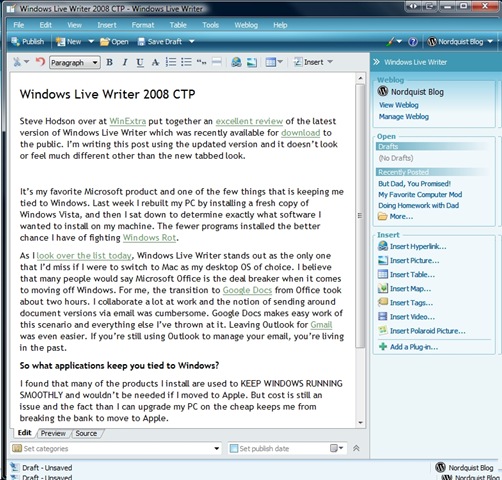
Windows Live Writer 2008 CTP

Steve Hodson over at WinExtra put together an excellent review of the latest version of Windows Live Writer which was recently made available for download. I’m writing this post using the updated version and it doesn’t look or feel much different other than the new tabbed look.

screen_2008-06-03 16.57.21

It’s my favorite Microsoft product and one of the few things that is keeping me tied to Windows. Last week I rebuilt my PC by installing a fresh copy of Windows Vista, and then I sat down to determine exactly what software I wanted to install on my machine. The fewer programs installed the better chance I have of fighting Windows Rot.

As I look over the list today, Windows Live Writer stands out as the only one that I’d miss if I were to switch to Mac as my desktop OS of choice. I believe that many people would say Microsoft Office is the deal breaker when it comes to moving off Windows. For me, the transition to Google Docs from Office took about two hours. I collaborate a lot at work and the notion of sending around document versions via email was cumbersome. Google Docs makes easy work of this scenario and everything else I’ve thrown at it. Leaving Outlook for Gmail was even easier. If you’re still using Outlook to manage your email, you’re living in the past.

So what applications keep you tied to Windows?

I found that many of the products I install are used to KEEP WINDOWS RUNNING SMOOTHLY and wouldn’t be needed if I moved to Apple. But cost is still an issue and the fact than I can upgrade my PC on the cheap keeps me from breaking the bank to move to Apple.

At least not yet.

Take It To The Web

I spent a couple of hours rebuilding my home PC yesterday which isn’t all that different from what I’ve done over the years. Except that it only took a few hours instead of an entire day (or night on a few occasions). 

In fact, installing Windows Vista Business only took about 30 minutes. That was the easy part. Once I had it installed, I ran Windows Update which found a lot of updates, 75 to be exact. Some of these were for my specific hardware such as video card, sound card and network adapter. I estimate that Vista has spent at least two hours downloading and installing updates. That’s a lot of time but things seem to be running well and I’ve not run into a single driver issue so far.

Capture
Upon install, expect Vista to find many updates for your system.

Here’s a list of the programs I install first:

  1. 7-Zip – Open source archive utility.
  2. CCleaner – Cleans up your PC including registry.
  3. Clip Diary – Keep a history of your clip board.
  4. FileZilla – Open source FTP program
  5. ICE Mirror – Syncs folders/files between two drives
  6. Threatfire – Security program that analyzes virus behavior
  7. UltraMon – Must have dual monitor utility
  8. uTorrent – Tiny bit torrent program
  9. Adobe Photoshop Elements – For simple photo touch-up
  10. Windows Live (Writer, Photo Gallery, Messenger)

Even two years ago this list would have been two or three times this size. Products that run from the web are replacing boxed software. When I bought my first computer in college, I had to go to a computer store in order to purchase a game. My children will have no concept of that as everything they need will be a Google search away.

Did you notice one program I left off my list? I’m talking about Microsoft Office, and it used to be the first program I installed when I built a new computer. I no longer have any need for it at home. I have to install it at work because most of my coworkers still enjoy passing files around via email which seems about as fashionable as listening to Hootie and the Blowfish.

Removing Microsoft Office from your computer is the equivalent of getting a substantial performance upgrade for free. I’ve replace the bloated, buggy, resource hogging Outlook with Gmail and the rest of Office with Google Docs, and I can’t believe I didn’t do it sooner. Besides the speed, stability, no patching, no upgrades, nothing to install nature of Google’s products, I love having access to everything on my phone. I feel like to jumped 5 years into the future when I got rid of Office.

When I upgrade my PC and reinstall Windows every few years, I’m sure that list will continue to shrink as more products move to the web. I hope my children won’t have to waste time patching their operating system and updating their software.

I wish I were as lucky. Windows Updates is telling me it found 4 more "important" updates it wants to install. Lucky me.

Microsoft releases the Worldwide Telescope

Microsoft released the Worldwide Telescope for download this weekend. This is the coolest product I’ve seen come out Microsoft in years. Maybe ever. This is the product that made Robert Scoble cry the first time he saw a demo and now I understand why.

1679576048_d7c60ed281_o

I can’t stop clicking around the galaxy. This is very addicting. Work can wait while I zoom around the cosmos.

It’s breathtaking. Amazing. And freaking cool.

Hey, Microsoft just created something cool that doesn’t have a big green X on it.

I like that Microsoft put out a product just because they can. I have no idea if they will attempt to create a business or service. But there’s no doubt that my kids will have the opportunity to learn about space and the universe in a manner that wasn’t available to me.

Why I Left Microsoft Outlook for GMail

I’ve used Microsoft Outlook for just over 10 years. It’s been one of my favorite Microsoft products over the years. Before that I used a combination of Pegasus Mail and PINE. I liked Pegasus so much that I may not have switched to Outlook had I not gone to work for Microsoft in the mid 90’s. It was elegant, speedy and very powerful.

The early versions of Outlook didn’t impress much much (wasn’t it called Exchange Mail?) but, over time, it grew on me. I liked having my email, contacts, tasks and calendar in one area. At work, I came to appreciate how it allowed me to schedule meetings and locate times when participants were available. Yet over time, it become bloated and used a lot of system resources. Worse yet was the fact that several of my PST files become corrupt. That Microsoft includes a PST Scanner with Office to fix corruption (sometimes) leads me to believe this isn’t a rare problem.

A few months I started using Google Docs at work because a number of us update the same files over and over, and I didn’t like the idea of emailing them around each time an update was made. I wrote about how I’ve stop using Word a few weeks back and I can’t imagine going back to it. I still occasionally use Microsoft Excell when I need to create a more complex graph or chart, but Google Docs covers my needs 95% of the time.

When Outlook 2007 started acting up at home a few weeks ago, I decided to switch to Google’s Gmail service. This presented several challenges such as how to move my existing PST file into Gmail which includes not only my email but my calendar and contacts. I researched a few options until a follower on Twitter suggested GMove. I bought the GMove for twenty bucks and it works as advertised. I like how it allowed me to chose which folders to sync to Gmail. It even sets up Gmail labels and tags email which makes it easy to migrate and organize lots of emails. (If you use GMove not that I got it working best using the Google POP option)

screen_2008-04-27 23.08.26

I cannot believe how fast Gmail feels compared to Outlook. I think I became accustomed to the sluggishness of Outlook, but Gmail is super fast. Labeling email feels a lot more natural than using folders to organize email and the search…OH THE SEARCH! in Gmail just schools the lame search in Outlook. It’s no contest.

Tonight I moved Kim and hundreds of email to Gmail. So far so good. She immediately mentioned how she likes the look of Google Calendar compared to Outlook’s. That Google Calendar will SMS events to me is a killer feature. The potential uses of this single feature are countless.

The only thing I miss about Outlook so far is how it handled attachments. Outlook made it really easy to see the file types and has a nifty “download all attachments” option. But the speed and ease of Gmail shine everywhere else. It’s convenient to have access to my email from any computer and I will enjoy not having to worry about PST file corruption anymore.

First Word and Excell and now Outlook. What will be the next Microsoft product I rid my computer of?

Gartner States the Obvious

Gartner recently released a report that centered around the many challenges facing Microsoft Windows. Their conclusion will not surprise anyone who runs the bloated Vista: Windows is collapsing under it’s own weight and is need of drastic change.

image

Only Captain Obvious himself, Ric Romero, could be proud of this conclusion. The report chides Microsoft for trying to be everything to everyone and makes some suggestions for fixing the problem before Microsoft ceases to be relevant. Here are a few of their suggestions:

  1. Windows should be able to be tailored to specific applications
  2. Better security
  3. Make migration to new versions easier
  4. Simplify licensing to focus on specific devices

None of those suggestions tackle my primary gripe with Windows: Performance and stability degrade the longer one runs it. Some people call this “Windows rot”. I shouldn’t have to run a toolbox full of utilities to fix problems Windows causes. I’ve been running a fresh install of Windows XP on my current dual core machine for about 6 months. It started out running quite well, but each week, it takes longer to boot, applications take longer to load and the general experience deteriorates into a routine of frustration. Why should anyone have to spend a day rebuilding his or her machine just to get it back in working order?

When Gates announced the plan to get Windows 7 out the door by next year that effectively froze many corporate IT departments and their decision to upgrade to Vista. Why spend a year upgrading hardware and testing Vista when the next version is only a year away?

My suggestion to Microsoft would be to start from scratch and build a very scaled down OS that works well with the web. Make it modular so I can select or remove any applications. I never use Windows Media Player or Internet Explorer so why should I be forced to install either? Make it fast and stable and fire whoever decided UAC was a good idea. Stop gouging people $250 for the best version. Take a page from Apple’s book and make one version. Make it self healing. When a problem occurs, don’t make me Google for the solution. Don’t tie it to your other properties like Live Search, Spaces or Passport. Windows should be a Gateway to everything else but not get in the way when I want to use non Microsoft product. The web gives me this agnostic experience.

Then again, does it really matter what the next version of Windows looks like? If I’m able to run the majority of my applications from the web then a browser running on top of a small, fast, scaled down OS is all one really needs.

This is how things will work. Microsoft can either adapt to these changes or fade away into oblivion.

Technorati Tags: , , ,