Wireless Cable Modem Gateway Upgrade

After dealing with a number of problems with Qwest DSL service, we switched to Comcast cable internet about four years ago. Comcast has been a more reliable overall although they too occasionally suffer from services outages. But unlike Qwest, they seldom last longer than a few minutes.

When we switched to Comcast, I purchased my own modem and wireless gateway device. I was surprised how few combo unit were on the market, but found one from Motorola at Fry’s for about a hundred bucks. The admin interface was an absolute mess, but it allowed me to restrict wireless access to the network by MAC address which works well for me without slowing bandwidth.

Over the past four years, we’ve added at least a half dozen wireless devices to our home, most of which are made from Apple and support 802.11n. The older modem/gateway only supported b/g devices which wasn’t a big deal until we began streaming video to our iPads. Lately we noticed slow connection speeds from the rooms furthest away from our modem.

Our current Motorola device an older model that didn’t support the newer 802.11n speeds, so I decided to upgrade to the Motorola SBG6580 Wireless Cable Modem Gateway.

It took a few minutes to convince Comcast to update the modem’s MAC address, but it’s been a great investment so far. While the upload speeds have stayed the same, the download speed has increased on average from 12 Mb/s to over 20. But more importantly, the increased wireless coverage and speed allows everyone to stream video from anywhere in our home.

The only downside I can think of is that the admin panel is still a horrible mess that makes little sense to anyone who isn’t a technonerd.

If you’re still running a b/g wireless router with newer devices you may want to consider an upgrade. The Motorola I bought has a street price of about $125-$135 and is available at Fry’s, Amazon, and NewEgg.

My Favorite iPad Apps

A few months into iPad ownership and I’m as excited as Beavis with a bowl full of nachos.

I keep my iPad screens quite tidy. In fact, I now keep all my apps on one screen and remove those I don’t use often. Those I use regularly but not each day go in a folder. Those apps I use almost each day, gain a spot in the upper four fifths of the screen. And finally, those I have open all the time, are pinned to the lower bottom.

Here’s the run down on my favorites:

Alarm Clock Pro – Made for the iPhone but works on the iPad. Simple but gorgeous. 99 cents

Weather HD – The best look weather app I’ve found. 99 cents

Speed Test – Tests Wi-Fi and 3G speeds such as Ping, download and upload speeds. free

Writings – You may never go back to Word again. Love this simple text editor. 99 cents

ABC Player – Catch up on Modern Family, the Bachelor or, my favorite, the Shark Tank. free

Slacker – Check out my full review, but this is how music apps should be done. app is free, subscriptions run $3.99 to $9.99/month

Daily – Cancelled local paper and bought the daily, the newspaper designed for the iPad. app is free, annual subscription is $39.99

60 Minutes – Always something to watch in the archives. Brings out my inner news junkie. $4.99

Air Video – Amazing app allows me to stream video from my PC to my iPad. Get your nerd on. $2.99

NPR – You could waste months diving into this app, but you’d be a lot smarter. free

Video Time Machine – Just download this now. Seriously. Stop reading and do it. 99 cents

Car Buzz – Everything you wanted to know about cars from total car nuts. free

MyPad+ – If you’re on Facebook, you’ll want this. 99 cents

Twitter – I prefer TweetDeck on Windows, but Twitter on iPad and iPhone. free

Diigio Browser – Do you wish your iPad browser looked and acted like Google Chrome? free

Week Calendar – A major upgrade to the default calendar. Love this app. $1.99

Reeder – Saved the best for last. My favorite app. Makes reading RSS feeds fun, and syncs with Google Reader. I spend more time in this app than any other. $4.99

iPadScreen

Writings for iPad

Sometimes I come across something so simple or so elegant or so dang fun to use that I have to share it.

Imagine the bloated Microsoft Word product for a moment with the ribbon, endless options and sluggish performance many of us have grown accustomed to. Using Word to create a simple text document is akin to removing a sliver with a battle ax.

Writings for the iPad is the polar opposite of Word. It’s simple, elegant and actually fun to use which isn’t an adjective often used to describe a text editor.

It might be the best 99 cents you’ll spend if you own an iPad and your editing needs are simple. I use Writings to jot down notes and create blog posts like you’re reading now. It also syncs to Dropbox.

Check out the video here for a quick demo and link to download.

Simple Backup

It happened again today. A friend called me asking for help in reviving his PC that will no longer boot. He believes he caught a virus. I plugged it in, and sure enough, it won’t boot.

“Do you have your important files backed up?” I ask.

Queue the awkward pause. I got my answer.

 dilbert-2010.04.07

Unfortunately, I’ve seen his scenario play out half a dozen times over the past year. A family shares an older model PC, usually running Windows XP or Vista. Files are saved haphazardly to a local drive. Malware and viruses enter the computer and eventually slow or shut it down. Or worse, a hard drive bites the dust.

And nobody backed up files to an external drive, CD/DVD, or online.

So this post is for my friends and readers who are in a similar situation. Eventually your hard drive will crash or you’ll catch a virus, or your children will delete the folder where all your financial data was saved.

I could tell you about nifty online back solutions or explain how I use a couple of small programs to copy files from one drive to another. But I’ll save that for a later post.

If you do not have a backup solution, stop what you’re doing and order this 500 gig drive from New Egg. Or this 1 TB drive if you have a lot of videos, music or other files that take up more space. This is not the most elegant or even the most effective backup solution. But it’s far better than nothing at all.

About a year ago, I advised my father to pickup an external drive and it’s saved his behind a number of times.

If your hard drive dies, and you end up paying someone to extract your data off it, you could be looking at hundreds if not thousands of dollars. And that’s the best case scenario.

About 10 years ago, I lost a years worth of pictures around the time our second child was born. I’m still kicking myself because I knew better.

Don’t let that happen to you. Grab a drive and backup your files today.

Whom Do You Trust?

When I began this blog, I wrote mostly about technology. It didn’t take long to learn that I had little to say, and what I did say, wasn’t interesting. Then Engadget and Gizmodo burst onto the scene and killed the category.

Yet, as much as I enjoy keeping up on the latest gadgets, large sites like these have little influence in what I purchase. I’m far more likely to make a purchase after Dave Winer blogs favorably about a netbook, or when Aaron Massey tells me how his children use his iPad.

Whenever Ben Talbert or Keli Dean share a song, I’ll immediately add it to my playlist. If Mike Henneke mentions a new blog he’s following, I’ll add it to Google Reader. If Louis Gray posts a link to an article on Twitter, I’ll add it to Instapaper.

Each of these individuals have earned my trust, and I value their opinions.

Google can clutter the web with ads and companies can seed product reviews at Amazon. And that ad disguised as a travelogue of Disney World is just another mommy or daddy blogger who didn’t want to get left out of the action. I can’t tell whose pockets are being lined with free products anymore.

That’s why I turn to my friends when I’m researching a product. With that in mind, I want to share two products I love. (I purchased both products and I don’t use affiliate links.)

The first product is geeky and takes some work to install, but the payoff is nothing short of a stunning speed increase of my Windows 7 box: Corsair Force 115 GB SSD.

I replaced an aging SATA drive tonight with the Corsair. It took the good part of my evening to drop an image of my Windows partition onto the SSD, but I’d do it again in a heartbeat. My system is so quiet and boots in under 30 seconds. And, oh the speed!

For about $160, it feels like one of those Maximum PC geeks got hold of my PC and overclocked the crap out of every component. The speed in intoxicating. Why did I take so long to make the move? SSDs have come down I price, but are still expensive per gigabyte. They also work best when paired with newer motherboards. But no way am I ever going back to SATA.

The other product I recommend is for iPhone and iPad owners: Reeder.

I use Reeder more than any other app on my iPhone and iPad. What is it? Well, Reeder is an RSS reader that syncs with Google Reader. This is the most elegant app I’ve used. So simple on the surface, but incredibly powerful without shoving feature after feature in your face. Reeder reveals itself slowly, but you’ll come to appreciate the dozens of small touches that make it a joy to use.

This is the app that, more than any other, keeps me on iOS. Flipboard gets all the press and it’s well-deserved. But it’s Reeder I’m use more than any other app.

The iPhone version is $2.99 while the iPad version is $4.99. If you read even a handful of blogs, you’ll love it.

Have you found any great products lately?

Goodbye Firefox, Hello Opera

For at least six years, I’ve been telling friends and family one of the smartest moves they can make is stop using Microsoft Internet Explorer. There’s just no reason to get caught using a shoddy and unstable browser. Microsoft basically allowed IE to languish once it reached 90% market share. But then Firefox came along earning a strong reputation on the backs of the digerati and taking market share from IE. It become a wonderful and well deserved counter story to the Redmond behemoth.

Firefox has been my browser of choice for many years now. I’ve convinced many friends to use it instead of IE. I loved the early versions of Firefox that were small, fast and stable. It didn’t try to do everything, but what it did, it did very well. No built in email program or news reader. But over time Firefox has become more like IE by adding more and more features to the point where it now feels as bloated and slow. 

opera

Over time I’ve become more frustrated with Firefox yet continued to use it. No way am I going back to IE. Safari feels weird and reminds me too much of iTunes. Google Chrome feels like those early Firefox versions but doesn’t support plugins.

That brings me to Opera. I’ve tried versions here and was impressed with its speed. But it just didn’t feel quite right.

Until now.

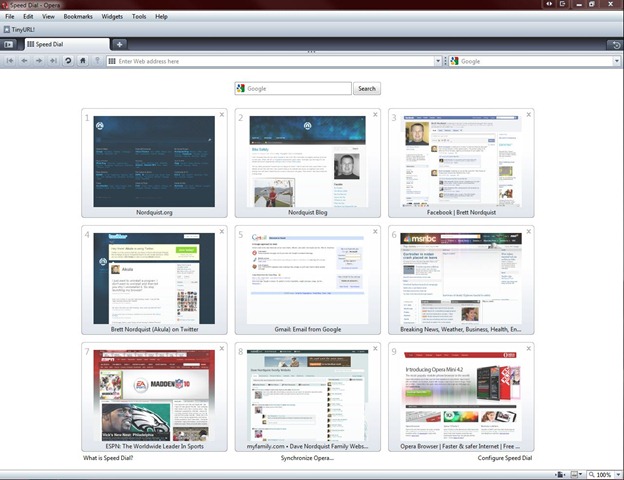
I’ve been using Opera 10 for a few weeks at home and work and I freaking love it. It combines the speed of Chrome with the features of Firefox while tossing in a dose of personality. I love Speed Dial (pictured above) and the included Mouse Gestures. It’s stable and clean.

But that speed! Not only is it more responsive than Firefox, but it feels so dang fast. This is a product created by a team who loves the web. Everything feels right. That’s the best complement I can give it.

The First Five

I recently wiped my PC in preparation for installing the release candidate of Windows 7. It used to take a couple of hours to install Windows from scratch and then a couple of days before I had all my applications reinstalled and configured just right.

But those days are over. I’m spending more time on Facebook and Twitter and have replaced a number of applications with simplified web apps. I replaced Microsoft Outlook with Gmail last year and haven’t looked back. Google Docs has nearly replaced Microsoft Office.

Yet I still rely on a few applications that haven’t been replaced by web counterparts. Here’s a list of the first 5 applications I’ve installed on my Windows 7 computer. I’m going to assume the FIRST program you install is a new web browser. I prefer Firefox but Opera, Chrome or Safari will do.


digsby

Digsby is a simple chat program. It replaced Windows Live Messenger for me when it added integrated Facebook chat and Gmail notifications.

Last.FM is an unbelievably cool app. If you’re familiar with Pandora or Slacker Radio you’ll love Last.FM. Discovers new music I enjoy and allows me to share it with friends. Check out my favorite artists here.

image

Threatfire is the one program to install if you try only one of these apps. I’ve run it for the last two years without any AV software. That’s how much I trust it. Threatfire detects and stops harmful behavior to your machine.

ultramon_logo

UltraMon fixes a big hole in Windows 7: Dual monitor support that works. Adds   an intelligent task bar to your second monitor and allows you to configure desktop backgrounds independently among other features.

Mesh

Microsoft Live Mesh is my favorite product from Microsoft. I wrote about it in January and rely on it everyday. Mesh syncs files between my home and work computers.

The Flip Mino HD Rocks

Last year I bought a small Canon camcorder. It fit in my hand but turned out to pain in the butt to use. I didn’t enjoy fumbling around with the tiny tapes and getting video off the tapes was an exercise in tedium. Toss in the fact that the battery life was pathetic and it’s no wonder it seldom saw use outside of the occasional birthday party.

I looked for reasons to use our Nikon D40 instead. It’s not like I don’t enjoy taking video of the kids but the Canon was more hassle than fun. flipmino

So I started looking for a video camera that’s easy and fun to use a few months ago. And then I came across a post from Robert Scoble who loved his wife’s Flip Mino HD. I decided to check it out. Wow was I impressed!

If you’re looking for a tiny, easy to use video camera that’s a total blast to use, check out the Mino HD. It’s simply the coolest device I’ve purchased in years. Whenever I pull it out to take video, people assume I’m using a tiny camera, and they are blown away when I tell them I’m taking high def video.

My favorite features are:

  1. USB connector flips up from top of camera. No cables. USB charges battery too.
  2. Stores an hour of video on internal 4 GB memory.
  3. Supports 720p resolution.
  4. So simple, anyone can figure it out in seconds.
  5. Uploads directly to YouTube and other video hosting services.
  6. Tiny! About the size of two packs of Bubble Yum.

I could go on and probably will if you happen run into me using the Mino in public. I tell everyone I see about how cool this little gadget is. Here’s the first video I took of my kids riding their Kett cars.

http://vimeo.com/moogaloop.swf?clip_id=3313083&server=vimeo.com&show_title=1&show_byline=1&show_portrait=0&color=&fullscreen=1
Kett Car Racing from Brett Nordquist on Vimeo.

It retails for $229 for the HD version. Less expensive, non-HD versions are available for about $50 less, but I suggest grabbing the HD. The video quality is stunning for such a small device.

I’ve spotted the Mino HD at Best Buy although I bought mine at BH Photo for $209. Highly recommended.

Lucky 7: The iPhone Apps I Use Every Day

Now that I’ve had a iPhone a few weeks I’ve had the opportunity to try a number of apps. Although a few of them failed to live up to expectations, I’ve enjoyed most of them, especially those recommended to me by friends on Facebook and Twitter.

Naturally, I’m using a few of the most popular apps such as NY Times, USA Today and Facebook. Everyone knows about those. For that reason, I’ll focus on a few lesser know apps that I’m using each day. Links open in iTunes.

bylineicon

Byline
I use this app more than any other because it provide true two-way synch with Google Reader. It grabs all my feeds so I can read them when I know I’ll be offline. Even includes a built in web browser for those blogs that provide only a partial feed. Well worth the $4.99

frenzic

Frenzic
One of the most addictive puzzle I’ve played since Bejeweled. I love the sounds and the colors and the polished feel of this simple, fast paced game. The touch screen controls are perfect. The perfect time waster. $4.99

quickvoicerecorderfree

QuickVoice Recorder
A very simple to use voice recorder. No useless features. Just does what it says. If I’m driving home from work and an idea for a blog post hits me, I use this app to record it.  Free

shovel

Shovel
If you’re a Digg addict, this is a must have app. Pulls in posts from Digg in their Popular, Top Stories, Movers and Shakers and Brand New categories. Digg is my favorite place for tech related news and odd stories that don’t hit mainstream outlets. Free

craigslist

Craigsphone
Sure this app lets you search for an apartment, job or girlfriend but I’m putting it on this list for one reason: Best of Craigslist. It never fails to make me laugh. You’ll find it under the “Featured” section. Free

sportacular

Sportacular
This is crack for the sports junkie. I can drill down to game, team and season stats for any team or league. Updates on all the major sports every 30 seconds in an easy to use and responsive program. No banned substances required. Free

lastfm

Last.FM
As much as I admire Pandora, I prefer Last.FM for a couple of reasons: 1. Better Windows desktop player 2. Advanced social features. I like being able to see what my friends are listening too. You can’t go wrong with either, but give Last.FM a try if you want to see the future of music. Free

What apps do you use on your iPhone or iPod Touch each day?

Don’t Knock The Pump

I don’t remember when it happened. Must have been when I was out of college and dropping fifteen bucks on a bottle of soap didn’t require eating Top Ramen for a month.

soap

At some point I got tired of picking up a cold, wet bar of soap each morning. No matter how I tried to store my soap it ended up in a puddle of frigid, cloudy water. Forget the fancy little soap trays. They are like little wading pools for your bar of Dove.

I saw this bottle of Clinique Liquid Facial Soap one day at Nordstrom and decided to give it a try. The women dressed in white lab coat with impeccable skin and hair tried to steer me towards the line of men’s products in the ugly grey containers.

But I wanted the soap in the translucent green bottle. I bought it and haven’t used anything since.

The soap is dispensed through a pump. No more fishing for a cold one each morning.

How unmanly is that?

Back to watching Sex and the City reruns.