My Top 5 WordPress theme collections

I’ve searched, bookmarked and tested dozen of WordPress themes over the past few years. Although it’s easy to run a Google search for themes, I thought I’d post a few of my favorites collections.

  1. SmashingMagazine – A great place to start in search of a unique theme.
  2. Weblog Tools Collection – These are the themes you’ll see listed at the bottom of the admin menu within WordPress itself. I’ve linked to the archive. I like how they call out those themes that include sponsored links.
  3. WPThemesFree – You can view a large number of themes here and sort by a number of criteria. One of the few where you can sort by category such as those themes that are geared to photographers or business or fashion.
  4. Minimalist Themes – Are you tired of the fancy themes with splashy graphics and multiple frames? This set of themes might be for you.
  5. Silent Bits – This blogger has put together a list of his favorite themes. I like nearly all of them.
Technorati Tags: ,

Windows Live Writer Review

Do you spend as much time formatting your blog posts as you actually writing them? WordPress is a fantastic blogging platform, but the included editor can be frustrating for those who would rather spend their time writing than mucking with formatting tags.

Over the past week I’ve spent a lot more time writing than mucking. This is due to the discovery of Windows Live Writer. Here are a few of the things I like the most:

  1. Setup – Getting up and running was a cinch. All I had to do was install the program, give it my blog address along with my username and password and I was off and running. Painless.
  2. Web Layout View – This pulls in the theme from your blog so that when you write, it looks just like your post will look. This lets me get the formatting down exactly how I want.
  3. Image Handling – I used to spend a lot of time trying to format my images. So much so that I’d usually give up or just post a standard, inline picture and call it good. Now I can create posts like this one utilizing multiple imagines that take no time at all. The on-the-fly image resizing is just plain slick.
  4. Performance – I don’t know how they did, but this is the first 3rd party editor that doesn’t upload as a snail’s pace. It posts content very quickly, even those with images.

There is a lot more to like in addition to the above such as the ability to insert tags, video, and maps from Windows Search Maps. The best compliment I can give any software is that it just works the way I work. And that’s how it is with Live Writer. It’s easy to use yet includes the advanced features more experienced bloggers have to expect. It’s actually fun to use.

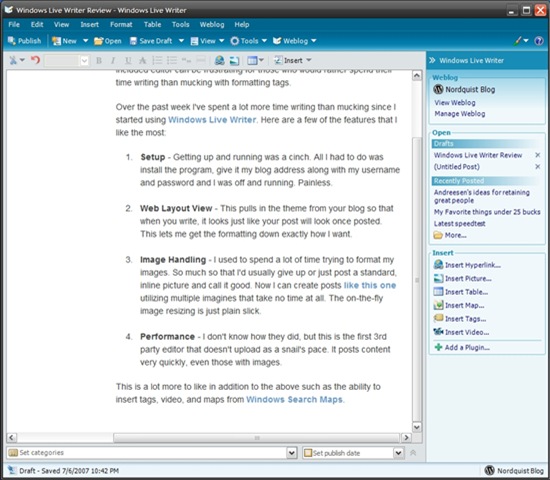
screen1Here is the main area of Live Writer. Basic formatting tools can be found from the top while more advanced formatting and content tools are positioned off to the right. Microsoft has raised the bar on what we should expect from an editor.


Windows Live writer

I was able to get Windows Live Writer working tonight. I followed the directions at that page for those having problems getting the program to install. Only took a few minutes to remedy the problem after which Live Writer installed without a hitch.

livewriterThis is the first post I’ve written using Live Writer and I’m already very impressed. This program has the most logical, easy to understand setup of any of the blog editors I’ve tried. I also like how it pulls the template from my theme so I can see what my post will look like in real time.

It’s fantastic to see Microsoft put out such a quality program while even in beta. It’s even better to see them support competing platforms such as WordPress. I can see myself spending more of my time in Live Writer than I do in Word.

One more thing that impressed me was that I woke up this morning after posting about my installation problems and saw a reply by a member of the Live Writer team who apologized for the problem and helped explain the error in more detail. That led me back to the site in search of a solution.

I’m blown away at how easy it makes handling images. I just dragged an image into this area, resized it in seconds, wrapped the text and added a custom border. All in about 30 seconds. That would normally take me several minutes to do in standard WordPress editor.

If first impressions are any indication, Microsoft has a winner on its hands in Live Writer. I’m glad my friend told me about it.

w.bloggar

I’ve been looking for a good WordPress editor. A friend of mine told me about Windows Live Writer which I tried to install tonight. For some reason it appears to install but I can’t find the program. Not off to a good start there. A while back to tried wbloggar but gave it up after a while. I’m going to try it again for a few days and see how I like it.

I’ve tried a few different plugins that add functionality to the WordPress editor but they all loaded so slowly. I don’t want to take a substantial performance hit just to update my blog.

We’ll see how this goes.