Bulk item shopping

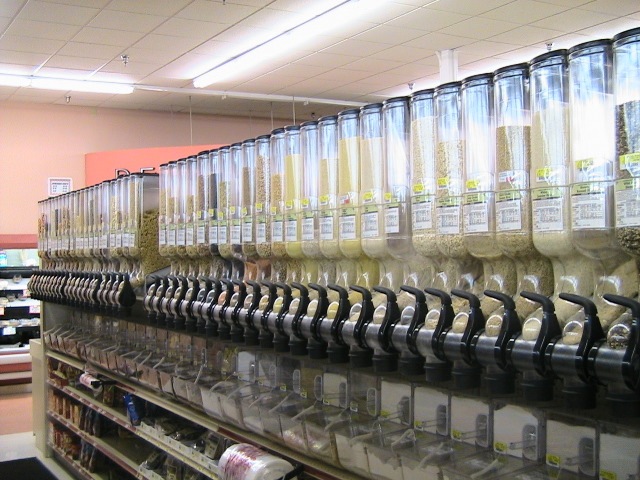
When I go shopping like I did tonight, I like to hang out around the bulk items. There’s just something cool about being able to scoop up dried apples, cranberry granola and wasabi pees without have to move more three feet to either side. Also, there are a few items I have never heard of before like the dried Mung bean and something called Millet. That keeps it interesting.

Tonight I browsed around for a bit before deciding on the bin full of roasted almonds. I noticed the cheap plastic bags hanging among the bins but I hate those things because they break so easily. I went searching for the good bags I’m usually able to find near the apples. Luckily, I was near the squash section and noticed a few of the good bags hanging there. I grabbed one and started shoveling almonds when an employee who was sweeping the floors nearby noticed me. She looked at the bag I was using and then she looked at me. She didn’t say anything but I could tell from her look that I wasn’t supposed to be using the produce bags in the bulk section. 

When I finished scooping what I thought to be about 2 lbs worth, I fastened a twist-tie around the bag and started looking for a pen to write down the bin number. I couldn’t find one and didn’t feel like asking the sweeper would be in my best interest so I memorized the bin number. But when I got up to the register to pay, I couldn’t remember the number. Luckily, the cashier didn’t seem to mind. She flipped through her little cheat book, found the item and ten-keyed the number before I could apologize.

Next time I go bulk bin shopping I’m going to make sure there’s no sweepers nearby and I’m going to put in one more big scoop to reach 2 lbs. I barely scooped a pound and a half of almonds tonight.
bins

Firefox flunking out

When Firefox burst onto the scene it was a breath of fresh air. It was the quick little browser that ran circles around Netscape and Internet Explorer. It was small, fast and stable. Over time, add-ons were written extending the its functionality. Some of these add-ons have become an integral part of my browsing such mouse gestures, tiny URL creator and IE Tab.

But something happened with Firefox version 2. Specifically, stability took a nosedive. I could go weeks without a problem when I ran the earlier versions of Firefox, but with version 2, daily hang-ups and crashes have become the norm. One bug I’ve found especially annoying is when I login to view my email using Outlook Web Access (OWA) and try to reply to an email, the browser hangs for a second and then closes down. It does this nearly every time I first launch OWA. Yet when I go back into my email, everything works fine.

I’m afraid Firefox has become the new Internet Explorer: Slow, buggy, and unstable. Yet I feel as locked into Firefox as I do to Windows as I can’t imagine not being able to run my favorite add-ons, but I’m getting close to installing Opera. I tried Opera about two years ago and it was super fast and included an open plug-in architecture like Firefox. But far too many sites wouldn’t render properly.

I might give IE 7 a try as well. Maybe I can slap a theme on it and make it look a little less homely.

Blogs in education

I read today that the new president of Wesleyan University started a blog.

With my daughter set to begin first grade in two days this made me wonder when her school principal will start a blog. How great would it be if the leaders at every level of education had blogs? I’d like to hear his/her take on education and how we can improve it at the school level.

I’m sure most principals are very busy and may not know where to go to start a blog. But as more do I hope word travels around that it’s not difficult and there’s a lot of people out there who are willing to help.

If any school administrators or teachers are reading this post, here are my two recommendations where you can start a blog for free. Both make it very easy to get started:

Blogger (Google)

Windows Live Spaces (Microsoft)

What is your backup solution?

I’ve gone from having no backup solution to obsessing about backup to today where I’ve greatly simplified my back strategy. Here is my setup:

#1 Drive 250 GB Internal for Windows XP and Programs

#2 Drive 250 GB Internal for Data (Music, Pictures, Video, Office files, etc)

#3 Drive 250 GB External NAS (Copy of #2 using NTI Shadow)

You’ll immediately notice my weak link to this strategy: If drive #1 goes down, I will have to reinstall Windows and all my programs. Over the years, I’ve found that having to reinstall Windows isn’t that bad and is needed at times. The pain in the butt comes from having to reinstall all my programs and then configure and customize them.  lifepre

So to save time I use a software imaging product called Acronis True Image. I take two images: One base image with only Windows XP, service packs and driver installed. And another image each month or so with all my programs installed. If you make a lot of changes to your machine you can set Acronis to take an nightly/weekly incremental backup. I save the images to drive #2.

This solution has worked well for me. I have two more machines on our home network and it’s nice to have the NAS drive online at all times. This backup strategy isn’t the perfect solution, but it does provide a good level of protection for those files that would be difficult or impossible to replace. I used to partition one drive so that no installed programs would reside on the same partition as Windows. But I found that some programs gave me problems or wouldn’t uninstall properly.

Notes: I create a My Documents folder on drive #2 instead of saving items to the desktop My Documents. I also setup Outlook so that its .PST file resides on drive #2. Some programs insist on placing files in My Documents so I’ll occasionally check this folder and copy it over to drive #2.

How To Grocery Shop Like a Guy

Occasionally Kim trusts me to do the grocery shopping. Like when she’s sick or it’s after midnight and she’s poured a bowl of cereal before realizing we’re out of milk.

I wouldn’t call myself a professional grocery shopper but I’m definitely in the minor leagues with a good chance of getting called up to the majors next year. 

Here are my tips for how to shop like a guy:

  1. Lose the list – Carrying around a list and checking items off is no fun. Why be a slave to a list when you can just stroll down every isle and carttoss into the cart whatever you feel like at the time.
  2. No Man Baskets – Grab a cart with four working wheels. Never, ever tote around the man basket unless you want to look like a total dork.
  3. Games and DVDs first – This is especially true at Fred Meyer where the games and DVDs are separate from the food. Always stop by here first. If you a find game or DVD you must have, you can adjust your grocery purchases to accommodate.
  4. Skip all non-food isles – Don’t even think about buying a hair product, lotion or medication as it will always be the wrong kind, wrong size, or wrong brand. It’s far easier to skip these sections and say you forgot. Occasionally I’ll make an exception to buy dental floss but that’s it.
  5. Never weigh anything – You look like a cheapskate trying to scoop out that exact pound of bulk cashews. I hate when I visit Baskin Robbins and some new employee decides to get all precise and weighs my ice cream. It’s tacky. Just scoop or bag the amount that “looks” right and move on.
  6. Avoid the Truck/Fire Engine Carts – If you got roped into dragging a kid along, make sure they understand you won’t be pushing them around in those impossible to maneuver carts that look like a cheap Disney ride. I tried pushing around two kids in a fire truck whose turning radius was so wide, I could only go down every other isle.
  7. Sample away – Sure the grapes might look good but you’ll never know until you try one. Or two or three. It’s a lot easier to sample a few before you drop 3 bucks on a pound flown in from some country you’ve never heard of. I feel like I’m doing the store a favor by sampling instead of taking the item home and then returning it when it’s bad. Anything in the bulk section is fair game as well. In fact, I think they encourage it.
  8. Buy at least 2 of everything – I came home from the store today with 4 bags of whole grain tortillas, 2 cartons of Atkins shakes and 3 bottles of peanuts. Why return next week and buy the same item? Dairy products are the exception.
  9. Ask questions – Especially in the produce section. People who work in produce love to extol their knowledge thereof. When I couldn’t locate a spaghetti squash a while back, I asked a nice lady who told me everything I’d ever want to know about squash and some finer details I could have done without.
  10. Use the good bags – Most stores have two kinds of bags in the produce section: the stronger hanging bags with handles and the absolutely sucky ones that you pull off a roll like a paper towel. Fred Meyer hangs the good bags near the apples as to not make them so visible. Stuff a few extra bags in your cart if you plan to hit the bulk section.
  11. Practice proper divider etiquette – Once you make it to the check out, look at the person ahead of you in line. If it’s a guy, don’t bother with a conveyer belt divider. But if a women is ahead of you, put down a divider before you pull any items from your cart to place on the belt. Women assume you’re trying to sneak that can of Slim Jim’s onto their tab.

I hope this helps the next time you’re called in to perform grocery shopping duties.

Technorati Tags:

When less is more

I attended a meeting at church today that included 5 adults and 5 boys ranging in ages from 12 to 16. The purpose of the meeting was to get the boys to work on half a dozen tasks. The person who called the meeting spoke the entire time. He spent the bulk of the meeting going through, in detail, each of the tasks and explaining what it would take to complete and how often he’d check in to ensure the tasks were done.

At the end, the leader asked the boys, “Can each of you commit to doing each of these tasks?”

The boys sat there. Finally, the leader, sensing they were confused, said, “Do each of you understand what I’m asking you to do?” Blank stares. The boys were frustrated. The leader was frustrated. Finally, one of the boys spoke up and said, “Can I borrow some paper and a pen to write all this stuff down?” 

I see this very scenario at least a few times each year at work and at church. And I’ve seen it with my kids when I overwhelm them with chores around the house.

So the lesson I learned today is to figure out what really needs to get done. You may have a list of 10 items that need attention. But dumping all 10 on a person or group is too much. Pare the list down to the one or two items that must get done. One or two tasks is manageable. I don’t need a paper and pencil to remember one or two tasks.

Sometimes less is more.

Tip for restaurant owners

This goes for cheap eats but especially for nice restaurants:

If you must hire employees who smoke, tell them they can only smoke where customers cannot see them.

Nothing turns me off faster than pulling into the parking lot and seeing an employee or two smoking near the front or back of the building. This is repulsive enough that I’ll keep driving and take my money elsewhere.

This would seem like a no brainer but this week I’ve seen it several times. Smoking is a gross, repulsive, nasty habit the rest of the us shouldn’t have to take smell or walk through on our way to a meal.

smoking

Technorati Tags:

Pinball on the PC

Playing pinball reminds me of the time I had just learned to ride a bike. We lived half a mile or so from Weber State University and I’d ride my bike across a busy 4 lane road, cruise down a hill, chase the ducks near the fountain and ride across the grass until I arrived at the Union Building where all the games were located.

I’d dash inside and hit the quarter machine before running over to the row of pinball machines. The machine I remember best was one called Space Invaders. It was special because it’s the first machine I remember that allowed the player to control 4 flippers instead of 2. It seemed that fewer balls were lost down the side of the table. I don’t know if that was true but the wide space made it feel that way. It was a fantastic pinball table with great sound and many surprises. It was so wide that I could barely spread my arms wide enough to make the flippers work.

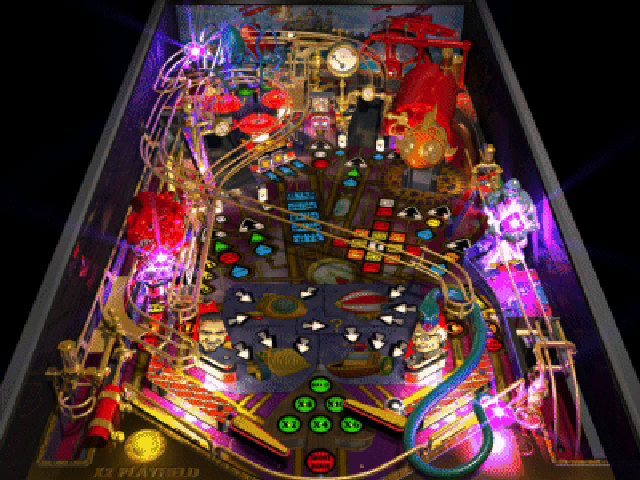
I’d love to own a real pinball machine or two. But until I can afford to spend $4000 or more I’ll have to settle for pinball on my PC. Over the past 15 years I’ve purchased most every software pinball game I could find. But the two I like best are made by Empire: Big Race USA and Fantastic Journey. Both are nearly 10 years old but still look beautiful by today’s standards. You can probably find them in the bargain bin and if you love pinball they are well worth searching out.  

bigrace fantastic
                 Big Race USA                  Fantastic Journey

Office Music

It’s a dog eat dog world when it comes to putting together a decent set of computer and office gear at work. Most equipment is handed down from one employee to the next. When one employee leaves there’s always a vulture or two swooping in to grab the new flat panel or faster computer. I once used 3 phone books to prop up my monitor until I was able to snag a real monitor stand. It’s Darwinism at work: Only the strong survive.

Over the years, I’ve learned diplomacy also has its advantages. One of the first things I did when I started my latest job I was to find someone in inventory who had access to the good speakers. I didn’t want the crappy sounding desktop cheapos. I wanted a nice set with subwoofer. I was able to round up a decent set of Harmon Kardons. I then went to work securing a decent flat panel monitor so I would have two monitors including my laptop screen. I learned that it pays to be VERY KIND to the person with key to inventory

I was also able to find a decent HP LaserJet printer, bookcase, white board and two padded chairs. I bought my own red, “Office Space” approved stapler which is a must have item in the office. I finally got around to paying Fred Meyer a visit to find some fake flowers and a basket full of grass to give my office a little color.

I hung a few pictures of the kids and placed several frames around the office. Kim will tell you that I’m a minimalist when it comes to decor and that’s a good way to describe my office. It’s not fancy by any means, but it works. I even have the requisite Krusty the Clown action figure on my bookcase. Sorry, no Star Wars or Star Trek LEGO space ships though.

Technorati Tags: ,