Wii passes 360 in worldwide sales

Take a look at the chart below which represents total lifetime, worldwide sales of the big 3 consoles. (Found at VGChartz)

A few thoughts come to mind:

  1. The 360 has bombed in Japan. Less than 500K sold.
  2. Imagine how much further ahead Wii would be if they were available. They are still hard to find most places.
  3. Sony is barely in the game. Good thing they still have the PS2.
  4. Looking only at Japan sales, the Wii beats the combined sales of Sony and Microsoft.

It’s funny to see Nintendo and Sony swap places going back just a couple of years. Nintendo has shown that innovative games still rock and will sell well. People will pay to be able to play franchise games like Zelda and Mario that aren’t available on the other consoles.

I love seeing Nintendo kick some Sony and Microsoft butt. Nintendo is also the only company to make money selling their console. Both Microsoft and Sony sell theirs at a loss. Nintendo is in a good position to further their lead over the next year. Sony has no momentum and Microsoft is taking a $1 billion hit to replace defective 360’s, effectively scaring away many potential buyers.

Update: Microsoft wireless racing wheel overheats. Someone needs to start a contest to see who can guess the next 360 part to overheat. My money is on the HD-DVD player.

ng_sales

Joel says Office 2007 box has learning curve

Office2007box After watching a coworker spend some time figuring out how to open a box of Office 2007 Pro I understand Joel’s frustrations. I don’t know why Microsoft decided to get all cute with their boxes, but isn’t the idea to make it as quick and painless to get to the product for your customer who just shelled out hundreds of dollars? The Office 2007 box looks like a book with its curved edge. If it looks like a book I’d assume it would open like a book. I guess not. For the most part, I’ve liked using Office 2007. Outlook works quite well and I really like Excel 2007.

Joel also had this to say about Vista. I couldn’t agree more.

I’ve been using Vista on my home laptop since it shipped, and can say with some conviction that nobody should be using it as their primary operating system — it simply has no redeeming merits to overcome the compatibility headaches it causes. Whenever anyone asks, my advice is to stay with Windows XP (and to purchase new systems with XP pre-installed).

Vista issues linger

I’ve documented the horrendous experience I’ve had running Windows Vista on this blog which has caused quite a number of friends, coworkers and people I don’t know to flame me for:

  1. Not knowing how to properly configure Vista
  2. Having exotic hardware
  3. Not having enough patience for drivers to be written
  4. (When all else fails) For hating Microsoft

Well, none of those reasons are true and it’s been a bit frustrating wondering if maybe I was doing something wrong with Vista. Maybe there was some magic yet hidden setting I just needed to tweak. I kept looking for the “Just Work” and the “Annoy Me Less” buttons. I never found them.

Well, over the past few days I’ve spoken with two good friends who are both big Microsoft fans. Both work in IT and have been Vista proponents. Yet things have changed. Both had changed their tunes and were in the process of moving back to Windows XP. To quote one friend, “I tried to like Vista. but it pesters me to death and runs slower than XP”. Chris Pirillo correctly notes the record number of MacBooks at Gnomedex this year. 

Although I was feeling a bit of Schadenfreude in all this, it’s too bad that Vista has caused so many problems and wasted so many hours. I still have a few diehard friends that work at Microsoft and are sticking with Vista. The only thing they can offer now is, “Just wait for SP1”. Isn’t that like buying a new car that turns out to be a lemon only to hear the dealer say, “Just wait for the first recall to be issued. That will force them to fix the problems!”.

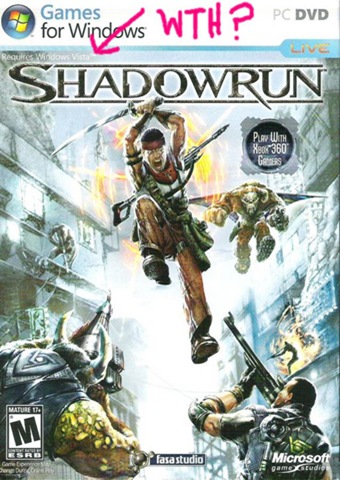
shadowrunKim continues to run Vista on her newer Dell machine. I bought her the game, Shadowrun, which only (this deserves its own post) works on Windows Vista. We’ve tried installing it several times and it refuses to install. This is absolutely absurd.

It sucks to feel locked into anything. I hate the feeling of being locked into a cell phone or broadband contract. And I certainly hate the feeling of being locked into an operating system. As much as I’d like to move to another OS, I’ve invested too much money and time on programs that only run on Windows. I don’t like the idea of running programs in a virtual machine so I get by running XP which works most of the time. Thank goodness.

My only question now is how long till Microsoft yanks XP support and stops pushing out updates and patches?

Update: Former PC Magazine Editor, Jim Louderback, has had enough of Vista too. He writes:

I could go on and on about the lack of drivers, the bizarre wake-up rituals, the strange and nonreproducible system quirks, and more. But I won’t bore you with the details. The upshot is that even after nine months, Vista just ain’t cutting it. I definitely gave Microsoft too much of a free pass on this operating system: I expected it to get the kinks worked out more quickly. Boy, was I fooled! If Microsoft can’t get Vista working, I might just do the unthinkable: I might move to Linux.

Technorati Tags: , , , , ,

Microsoft Live Search schools Google

Well, at least when it comes to searching for images it does. For the past few years I’ve used Google’s image search exclusively. But I started using Live Search’s image search and actually like it quite a bit more.

Take a look at this image search for “Seattle Mariners”

I like the results in Live a lot better than in Google. Live’s images are a lot more diverse and there’s less duplication. The look is very clean and I really like the “size slider” that allows you to increase or decrease the size of the images on the page. Nice touch.

Google’s results page looks cluttered by comparison. Also, the results listed on the first page aren’t very compelling. I don’t know what Microsoft is doing behind the scenes but Live’s results are a lot more in tune with what I’m after.

livesearchresults Live also includes a very cool feature called “Scratchpad” you’ll find in the upper right corner. Click on the scratchpad and a frame appears on the right which allows you to drag images to while you continue to peruse the results. Very easy to use and extremely helpful when I’m after multiple images or when I need to compare more than one image found on differing pages.

People who don’t feel that Google has any competition are wrong. Google may have a near monopoly on basic search but the barrier to entry is so low that switching search engines is trivial.

Microsoft has proven that they can innovate in this space and I hope they continue to give Google all the competition they can handle.

Not much has changed for Windows users

As I waited in line last night at Fry’s I noticed something peculiar: Customers (I counted 8) in line carrying boxes of Norton Anti-Virus. I also noticed three people waiting to buy a spyware program. I think it’s called Spyware Blaster.

I don’t ever recall buying an anti-virus program because there are a number of decent free one’s available. Personally, I’ve used eTrust for years, but I don’t know if it’s ever done me any good. I don’t open email from people I don’t know let along download or click attachments from them.

But it made me wonder if things have changed much for the average PC user over the past 10 years or so. When Windows 3.11 was around, there were many utilities one could buy to help keep it running properly. Remember PC Tools and System Mechanic? This was well before the spyware and adware days. The utilities I used most back then were a disk defragger and a duplicate file finder.

I notice the latest version of System Mechanic is advertised as fixing the following Windows (Vista compatible) issues:

Optimize PC for peak performance

Repair problems and errors

Clean up clutter

Remove spyware and fix security vulnerabilities

Maintain reliability and speed

I can’t imagine paying for Windows XP or Vista and then spending another fifty bucks to fix it. There’s an entire cottage industry around helping people fix or work around the Windows problems. Are PC users so lazy and so stupid that they mess up their computers to the point that 3rd party software is required to keep them operational?

Or is Windows so slow, so bug-ridden and vulnerable that such software is required?

norton


Is this guy smiling because he switched to Linux?

Wasn’t Windows XP supposed to fix this? How about Vista? How would you feel spending up to $400 on a new version of Windows only to find out that you’ll need to cough up more money for utilities to keep it running? Given my experience with Vista, I don’t believe there’s a utility in the world that can make it run as it should. It’s just downright annoying to deal with.

Ten years from now are Windows users going to be in the same predicament?

10 minutes with an iPhone

I visited the Apple store in Bellevue this afternoon and Apple iphone-2might as well call it the iPhone store. There were two giant iPhone replicas in the display case as well as two large tables of full of iPhones to touch and demo.

Say what you will about Apple but they know how to display their merchandise. Go into a Best Buy or CompUSA and their cameras, computers, mp3 players and phones are usually tied down. If you’re lucky, they are attached to a metal tether that’s long enough to lift it 6 inches off the table. You have the sense the last thing they want you to do is actually test out their products.

But the Apple store is just the opposite. Everything in the store is situated  and displayed as if to say, “Pick me up and see what I can do!”. Which is exactly what I did with the iPhone. A few quick thoughts gleaned from the 10 minutes I spent with it:

  1. Oh that display! Simply gorgeous.
  2. Touch screen worked better than I expected.
  3. It’s smaller and thinner than I thought.
  4. Compared to my Motorola Q, the iPhone felt speedy
  5. It’s bright. Did I mention that gorgeous screen?

For obvious reasons I couldn’t test out the phone feature but as a video iPod it was fantastic. Apple is so much further ahead than Microsoft and its Windows Mobile it’s not even funny. Compared to the iPhone, Windows Mobile is years behind.

It’s probably a good thing the iPhone doesn’t support Exchange mail or I’d want to ditch Verizon and switch.

Technorati Tags: , , ,

Mini-Microsoft on Xbox problems

When I first heard that Microsoft was going to extend Xbox 360 warranties to the tune of $1 billion my first thought was “Very cool”. My second thought was, “Mini is going to go ballistic”.

Well, sure enough Mini chimes in with a few choice quotes:

Now come on, how can you have to put aside $1,000,000,000 to cover faulty Xbox 360s and not go and hold President Bach or VP Moore or VP Allard accountable and fire them…

The only thing I’ve seen the Xbox business accomplish, besides making a lot of money disappear, is make Sony dash themselves against the rocks with the PS3. Monkey-see, monkey-do even better. In the meantime, the Nintendo little piggy gleefully exclaims, “Wii! Wii! Wii!” all the way to the bank.

For those of you unfamiliar with Mini, he is a Microsoft employee who has decided to blog anonymously. It’s not hard to understand this decision after reading a few of his posts.

MSFTextrememakeover asks, “What another $1B among friends?”

Technorati Tags: , ,

Windows Live Writer Review

Do you spend as much time formatting your blog posts as you actually writing them? WordPress is a fantastic blogging platform, but the included editor can be frustrating for those who would rather spend their time writing than mucking with formatting tags.

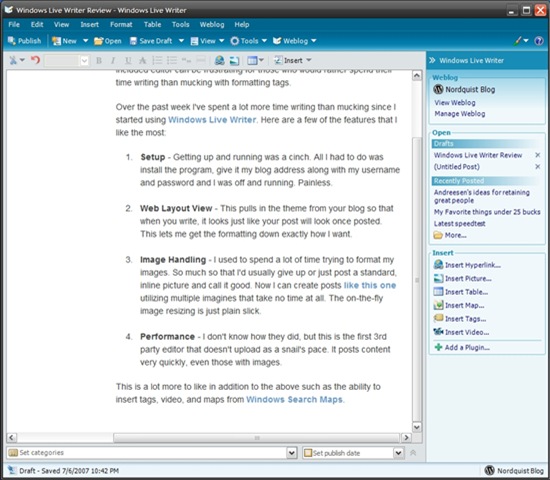
Over the past week I’ve spent a lot more time writing than mucking. This is due to the discovery of Windows Live Writer. Here are a few of the things I like the most:

  1. Setup – Getting up and running was a cinch. All I had to do was install the program, give it my blog address along with my username and password and I was off and running. Painless.
  2. Web Layout View – This pulls in the theme from your blog so that when you write, it looks just like your post will look. This lets me get the formatting down exactly how I want.
  3. Image Handling – I used to spend a lot of time trying to format my images. So much so that I’d usually give up or just post a standard, inline picture and call it good. Now I can create posts like this one utilizing multiple imagines that take no time at all. The on-the-fly image resizing is just plain slick.
  4. Performance – I don’t know how they did, but this is the first 3rd party editor that doesn’t upload as a snail’s pace. It posts content very quickly, even those with images.

There is a lot more to like in addition to the above such as the ability to insert tags, video, and maps from Windows Search Maps. The best compliment I can give any software is that it just works the way I work. And that’s how it is with Live Writer. It’s easy to use yet includes the advanced features more experienced bloggers have to expect. It’s actually fun to use.

screen1Here is the main area of Live Writer. Basic formatting tools can be found from the top while more advanced formatting and content tools are positioned off to the right. Microsoft has raised the bar on what we should expect from an editor.


Geek Squad for Cell phones?

I am enjoying my Motorola Q phone from Verizon. The sync with Windows Exchange just works as does Mobile Messenger. It’s a good phone, good IM device, and great email/SMS device. I also run a little application that shows a color coded map of the Seattle area traffic which helps plan my route into work. Even the web browsing isn’t bad as I’m able to read my RSS feeds in Bloglines quite well.

Now that I’ve got it setup, the Q is great little device. But I wouldn’t wish the setup process on my worst enemy. The setup of the last computer I bought from Dell took less than 30 minutes to unbox, setup and configure.The same process for my Q took at least 4 hours.

One major point of confusion is Microsoft ActiveSync which I now refer to as ActiveSuck. It might not suck so bad had I not been used to the sync app for Palm based phones which provide a number of helpful options not found on ActiveSync. For example, the first time you sync your Palm the program gives me the option to synch the phone with Outlook, have the phone overwrite Outlook or have Outlook overwrite the phone. I bought a used Q with over 460 contacts and ActiveSuck assumed I wanted them sync’d to Outlook.

Motorola provides a software update tool that makes it fairly easy to update Windows Mobile. Once I had the latest software installed, I was able to begin the Exchange email configuration. The issues here are numerous and boring so I’ll skip them except to say I believe many of the hoops I had to jump through are probably due to security precautions setup by Microsoft’s IT department.

Maybe I’m getting old, but is it normal to expect spending an entire afternoon setting up a new phones these days? This isn’t just a Motorola or Microsoft problem. I recall thinking the same thing during the setup of my first iPod.

Is there such thing as a Geek Squad for mobile devices? That might not be a bad business idea.

Technorati Tags: , , , , ,