Impulse buy at Fry’s

I like the whole experience of visiting Fry’s Electronics. I like the young man or woman who stands near the entrance greeting everyone who enters. I like the newspaper ads plastered on the wall near the entrance. I love the “wall of motherboards” and the sheer number of external USB drives available for purchase. There are entire rows and sections of products which I have no clue what they do or how they are used. Maybe it’s a medical device. Maybe it’s a piece of the Space Shuttle. I have no idea.

refigerateur_usb_canette_boisson I like it all. But I really enjoy the random impulse item located next to the cash registers at Fry’s. I can always count on finding a totally useless item in this area, and today was no different. Next to each register was a stack of UBS Beverage Chillers.

 Now it’s one thing to head to the checkout with a game, a monitor or printer and come home with a pack of gum, Snickers or even Chapstick lip balm because my impulses got the best of me.

But how does one explain the desire to add a USB Chiller at the last second to a spouse? It makes sense for Fry’s to put them in this area because I can’t imagine anyone enters the store thinking, “I gotta remember to pick-up that USB Beverage Chiller”.


Technorati Tags: , , ,

How to improve cell phone service

Dealing with cell phone companies has provided some of the best examples of how not to treat customers. I must talk to 20 people that hate their cell phone provider for every person who is satisfied. 

Here are a few suggestions for cell phone companies I’m certain they will ignore:

  1. Don’t lock me into a 2-year contract – I understand this is difficult when people expect a free or very inexpensive subsidized phone, but I’d rather pay more for a phone and not be locked into a contract. Every month I remain an unhappy customer (or pay the $150-$200 early termination fee) is a month I’m building feelings of hatred towards your company. Why not let me go elsewhere rather than ensuring I’ll never try you again?
  2. Provide a realistic monthly fee estimate – You know that $60/month plan is going to cost $85/month. Why not tell me that right from the start? Surprises suck.
  3. Make removing features as easy as adding them – If I can add additional features to my service from your website I should be able to remove them there as well. Don’t waste my time by making me call a customer service rep who’s only job is to keep me from canceling the feature or upselling me on “new” feature.
  4. Allow your CSRs to make reasonable decisions – I’ve called in to make basic changes to my account and been told I’d have to speak with another department, a supervisor or call another number. Stop the run-a-round and help me!
  5. Notify me of new deals – It really sucks to hear about a new plan with more minutes, more features at a lower price from a new customer when I’ve been a loyal customer for years. If my plan changes, let me know. I shouldn’t have to call in to receive special deals. If you are pro-active, I’ll remember it and become even more loyal.
  6. Provide easy and fast activation – Verizon does a decent job here. If I want to activate a new phone at 2 am, I should be able to do that instead of calling back during business hours.
  7. Treat me like you value my business – This is the most important. I’m going to talk and blog about your service. Would you rather I tell potential customers to give your service a try or to avoid it like the plague?

I want to like my cell phone company. I had a horrendous experience with Sprint before I moved to Verizon. Verizon isn’t perfect but they are pretty good and getting better.

Technorati Tags: , , , ,

How to cure Vista sidebar envy

googlesidebarSo you’ve decided to stick with Windows XP, but you’ve a little envious of the sidebar you’re friend is running on his copy of Vista? Well, you can get a sidebar of your own on XP that takes up far less memory than the one on Vista.

Up until last year I ran Desktop Sidebar. It’s a good product with a huge number of skins and plugins available. It also has a number of pre-installed plugins giving you a lot of functionality out of the box. If you want access to the largest number of plugins, this is the sidebar for you.

But my preferred sidebar application is called Google Sidebar. It also has a good number of plugins (Google calls them widgets) for nearly anything you’re after. It uses very little memory and is quite stable. I also like it’s simple design and stability.

My favorite plugins are the analog clock, desktop photos, Outlook calendar, desktop stocks, desktop to do, desktop system monitor, and desktop weather.

EA CEO: Video games are boring, complicated

“We’re boring people to death and making games that are harder and harder to play”

EA Chief Executive John Riccitiello

Link to article at MSNBC

I certainly agree with Riccitiello that games are much too complicated these days. I was reminded this weekend what a joy many of the older games can provide when I picked up Super Mario 3 to play on the Nintendo DS Lite this weekend.

sm3 I love being able to pickup a game like Super Mario 3 and just play for 20 minutes or so. So many of the games today require a substantial time commitment, memorizing complex moves or turning to the web or books to decipher a map.

Playing a game like Super Mario 3 is like running into an old friend you haven’t seen for years yet within minutes you’ve picked up where you left off. The simple sounds, hidden areas and unique moves give this game so much personality. Highly recommended.

Technorati Tags: ,

My Top 5 WordPress theme collections

I’ve searched, bookmarked and tested dozen of WordPress themes over the past few years. Although it’s easy to run a Google search for themes, I thought I’d post a few of my favorites collections.

  1. SmashingMagazine – A great place to start in search of a unique theme.
  2. Weblog Tools Collection – These are the themes you’ll see listed at the bottom of the admin menu within WordPress itself. I’ve linked to the archive. I like how they call out those themes that include sponsored links.
  3. WPThemesFree – You can view a large number of themes here and sort by a number of criteria. One of the few where you can sort by category such as those themes that are geared to photographers or business or fashion.
  4. Minimalist Themes – Are you tired of the fancy themes with splashy graphics and multiple frames? This set of themes might be for you.
  5. Silent Bits – This blogger has put together a list of his favorite themes. I like nearly all of them.
Technorati Tags: ,

Mini-Microsoft on Xbox problems

When I first heard that Microsoft was going to extend Xbox 360 warranties to the tune of $1 billion my first thought was “Very cool”. My second thought was, “Mini is going to go ballistic”.

Well, sure enough Mini chimes in with a few choice quotes:

Now come on, how can you have to put aside $1,000,000,000 to cover faulty Xbox 360s and not go and hold President Bach or VP Moore or VP Allard accountable and fire them…

The only thing I’ve seen the Xbox business accomplish, besides making a lot of money disappear, is make Sony dash themselves against the rocks with the PS3. Monkey-see, monkey-do even better. In the meantime, the Nintendo little piggy gleefully exclaims, “Wii! Wii! Wii!” all the way to the bank.

For those of you unfamiliar with Mini, he is a Microsoft employee who has decided to blog anonymously. It’s not hard to understand this decision after reading a few of his posts.

MSFTextrememakeover asks, “What another $1B among friends?”

Technorati Tags: , ,

Vaja Case for Motorola Q Review

I’m a big fan of cases from Vaja. I purchased one for my iPod Video nearly two years ago and it’s held up very well while protecting my iPod. I recently purchased a Motorola Q and decided I needed a similar case to protect its handsome black exterior and screen.

I decided to see what cases were available for the Q and turned to Vaja first. You won’t find these cases at Target, Best Buy or the Verizon store. Vaja makes all their cases in Argentina from the best leather available. The downside is that all cases are custom built and can take several weeks to make and ship to you. The upside is you’ll have one of the very best cases available for your phone. If you’re looking for a cheap ten buck case, this isn’t going to be your cup of tea.

The Vaja website uses Flash for the case customization (see picture below). You are able to chose the leather type and colors as well as extras such as belt clips and personalization (name, initials, notes). I have no idea why anyone would want to add a note to the back of their case.

vaja

I decided on the basic black leather case for the Q called the classic. I selected the “Plain Aniline” leather option, black color scheme and passed on the belt clip and personalization. Total cost: $60. I then waited just over two weeks for the case to arrive via Fed Ex. It ships in a box that only Apple fans could appreciate. The box, instructions and enclosure are elegant.

I’ve been using the case now for about a week and I like it a lot. It fits the Q like a glove. In fact, it fits it almost too well because it’s very difficult to put on. This isn’t a big deal since I won’t be taking the case off very much if at all.

The Good:

  1. Top quality materials
  2. Tight fit, doesn’t slip
  3. Good screen protector
  4. Stitching is impeccable
  5. Looks fantastic

The Not So Good:

  1. Dust gets under screen cover
  2. Difficult to remove case
  3. Expensive

Conclusion:  A top quality case for those who are looking for stylish, well-designed case. A worth-while investment for those who tend to keep a phone for a couple of years. If you churn through new phones every six month it’s hard to justify the cost. But I highly recommend this case for the Q. From my experience with Vaja, you can’t go wrong with any of their products. They even has cases for the fancy new iPhone.

More Reviews of the Vaja case for the Q

Technorati Tags: , ,

I’ll know I’ve arrived when…

Some people say they will have arrived when they are able to buy a Mercedes Benz. Or a vacation house in Park City. Or a Steinway Grand Piano.

Not me. My goals are little less lofty.

I want my very own pinball machine. Preferably a basement full of half a dozen pinball machines. When I’m able to drop $4500 on a pinball machine, I’ll know I’ve arrived. 

pinball

Windows Live Writer Review

Do you spend as much time formatting your blog posts as you actually writing them? WordPress is a fantastic blogging platform, but the included editor can be frustrating for those who would rather spend their time writing than mucking with formatting tags.

Over the past week I’ve spent a lot more time writing than mucking. This is due to the discovery of Windows Live Writer. Here are a few of the things I like the most:

  1. Setup – Getting up and running was a cinch. All I had to do was install the program, give it my blog address along with my username and password and I was off and running. Painless.
  2. Web Layout View – This pulls in the theme from your blog so that when you write, it looks just like your post will look. This lets me get the formatting down exactly how I want.
  3. Image Handling – I used to spend a lot of time trying to format my images. So much so that I’d usually give up or just post a standard, inline picture and call it good. Now I can create posts like this one utilizing multiple imagines that take no time at all. The on-the-fly image resizing is just plain slick.
  4. Performance – I don’t know how they did, but this is the first 3rd party editor that doesn’t upload as a snail’s pace. It posts content very quickly, even those with images.

There is a lot more to like in addition to the above such as the ability to insert tags, video, and maps from Windows Search Maps. The best compliment I can give any software is that it just works the way I work. And that’s how it is with Live Writer. It’s easy to use yet includes the advanced features more experienced bloggers have to expect. It’s actually fun to use.

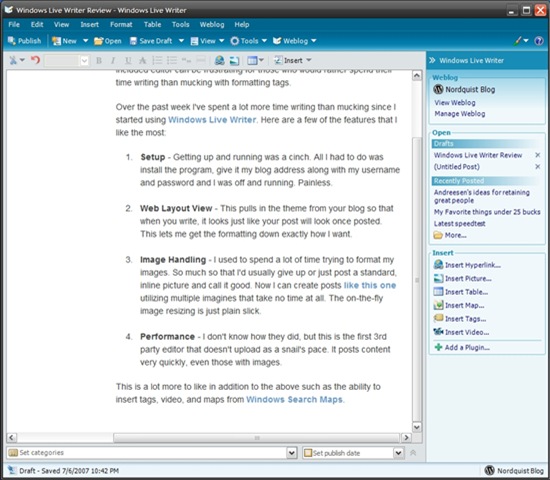
screen1Here is the main area of Live Writer. Basic formatting tools can be found from the top while more advanced formatting and content tools are positioned off to the right. Microsoft has raised the bar on what we should expect from an editor.


Andreesen’s ideas for retaining great people

I came across Mark Andreesen’s post tonight and he brings up some excellent suggestions for retaining the best employees.

THINGS TO DO

Focus: In a technology company, focus on retaining the great architects and managers — the people who are the magnets for retaining other great people and hiring more great people…You have to retain the magnets — or at least a critical mass of them — because without them, you’re going to lose everyone else.

Promote Your Best People: especially into the jobs vacated by the more senior of the people you just fired — and give them very interesting challenges.

THINGS TO AVOID

Don’t create a new group or organization within your company whose job is “innovation”:

This takes various forms, but it happens reasonably often when a big company gets into product trouble, and it’s hugely damaging.

First, you send the terrible message to the rest of the organization that they’re not supposed to innovate. Second, you send the terrible message to the rest of the organization that you think they’re the B team.

The last company I worked for did exactly what Mark says to avoid, and it was very destructive.

It’s tough to get excited about much when you’ve been relegated to the B Team. As tempting as it sounds to only include a chosen few, it’s best to widen the input and brain-storming meetings to anyone, regardless of title, to those who show an interest.

innovation