Gartner States the Obvious

Gartner recently released a report that centered around the many challenges facing Microsoft Windows. Their conclusion will not surprise anyone who runs the bloated Vista: Windows is collapsing under it’s own weight and is need of drastic change.

image

Only Captain Obvious himself, Ric Romero, could be proud of this conclusion. The report chides Microsoft for trying to be everything to everyone and makes some suggestions for fixing the problem before Microsoft ceases to be relevant. Here are a few of their suggestions:

  1. Windows should be able to be tailored to specific applications
  2. Better security
  3. Make migration to new versions easier
  4. Simplify licensing to focus on specific devices

None of those suggestions tackle my primary gripe with Windows: Performance and stability degrade the longer one runs it. Some people call this “Windows rot”. I shouldn’t have to run a toolbox full of utilities to fix problems Windows causes. I’ve been running a fresh install of Windows XP on my current dual core machine for about 6 months. It started out running quite well, but each week, it takes longer to boot, applications take longer to load and the general experience deteriorates into a routine of frustration. Why should anyone have to spend a day rebuilding his or her machine just to get it back in working order?

When Gates announced the plan to get Windows 7 out the door by next year that effectively froze many corporate IT departments and their decision to upgrade to Vista. Why spend a year upgrading hardware and testing Vista when the next version is only a year away?

My suggestion to Microsoft would be to start from scratch and build a very scaled down OS that works well with the web. Make it modular so I can select or remove any applications. I never use Windows Media Player or Internet Explorer so why should I be forced to install either? Make it fast and stable and fire whoever decided UAC was a good idea. Stop gouging people $250 for the best version. Take a page from Apple’s book and make one version. Make it self healing. When a problem occurs, don’t make me Google for the solution. Don’t tie it to your other properties like Live Search, Spaces or Passport. Windows should be a Gateway to everything else but not get in the way when I want to use non Microsoft product. The web gives me this agnostic experience.

Then again, does it really matter what the next version of Windows looks like? If I’m able to run the majority of my applications from the web then a browser running on top of a small, fast, scaled down OS is all one really needs.

This is how things will work. Microsoft can either adapt to these changes or fade away into oblivion.

Technorati Tags: , , ,

Dumb Signs

I love dumb signs. I mean, I really love dumb signs that are put up to discourage bad behavior. I find it curious that someone believes that another person will change their behavior just because a sign orders or threatens them to do so. Well, here’s a message for all you sign makers out there: It doesn’t work. Step away from the fat black Sharpie. Signs don’t work on people who exhibit bad behavior in the first place.

Dumb signs reach the wrong audience. They only reach those people who wouldn’t do what the sign warns them of in the first place. Like the sign on all new iPods that says, “Don’t pirate music“. Man, I’ll bet that little sticker tugs at the heart strings and stops those bad pirates in their tracks. Or how about the sign above the men’s urinal at a company I used to work for that said, “Do not post signs above the urinal. Signed, Building Mgmt”. A few days later some jokester posted a sign that read, “Do not post signs above existing signs above the urinal. Signed, The Urinal Hero” That right there is my all-time favorite sign.

So I get a kick out of coming across dumb signs like I did tonight as I drove through the Arby’s drive-thru. Quick topic change. Have you ever tried to order JUST A SANDWICH off the Arby’s menu? It’s nearly impossible. The person taking the order must be working off some spiff program because they jump into action trying to shove a combo meal down your throat. They can’t imagine anyone would decline fries and drink with the sandwich. Next time I’m there, I’m going to order a sandwich and then forcefully decline the combo meal pitch. Then I’m going to order a stand alone order of fries. You just know the order taker is gonna throw a hissy about this time and attempt a drink upsell. I’ll decline that. When I’m asked if that’s all I need I’ll pause and say, “You know what? I’ll take a medium Diet Pepsi”. It will be a combo meal the old fashioned way.

OK, so back to the sign. As I drove up to the window to pick up my hard fought sandwiches, I noticed the following hand-written, ALL CAPS sign posted right near the window for every drive-thru customer to see:

ALICIA’S MANAGER KEYS HAVE SUPPOSEDLY DISAPPEARED. THIS WILL RESULT IN TERMINATION! HOPEFULLY THESE KEYS WILL MYSTERIOUSLY SHOW UP IN THE CUP ON THE COUNTER.

Upon reading this sign my first thought was, “Well crap, Arby’s hired a thief”. If this person would steal from a colleague, wouldn’t it make sense they would steal from a customer too? My second thought was, “Putting them in a cup on the counter might not be the most secure option given the circumstances”.

I’m sure Alicia is upset about her missing keys. I’m just not sure every person that pulls up to the drive-thru needs to read about it. And honestly, if you took the keys even by accident, would you return them with the threat of TERMINATION looming? I love the exclamation point after TERMINATION too. Nice touch.

I picked up my sandwiches, looked to make sure my keys were still in the ignition and drove home with more questions than answers.

Technorati Tags: , , ,

Getting Started With WordPress

A number of friends and coworkers along with a few people who read my blog have asked for help in starting a blog. Most questions centered around what blogging platform and hosting company to use. I used to tell most of these people to take a look at Blogger and Windows Live Spaces. If they were geeks, I’d tell them to roll their own blog and install WordPress on their own domain. But I was hesitant to suggest that to everyone because I knew I’d be called on to provide tech support when they got stuck.

But over the past couple years or so it’s become easier for the less technically inclined to use WordPress. I’ll get into the reasons for this later, but if you’re reasonably comfortable using an FTP program you’ll have no problems getting up and running with WordPress. The installation and administration of is handled by a slick, easy to use web-based interface. Really, there’s nothing to be afraid of.

WordPress is a fantastic blogging platform for many reasons but a few of my favorites include it’s stability, ease of use and plugin and theme architecture. With plugins and themes, it’s easy to change the look of your blog and give it additional functionality without having to know how to program.

So here are the steps to getting up and running with WordPress. This assumes you want to run WordPress on an existing domain or register your own.

Select A Hosting Company

This is the most important decision you’ll make. A bad host will lead to lots of downtown and poor service and support while a good host will make the experience go smoothly. I’ve run WordPress on six different hosts and I can only recommend two of them: Pair and Bluehost. (Note: If you find this article helpful, you can help support me by signing up with Bluehost through the links found here. If you don’t that’s cool too) Both Pair and Bluehost are top notch hosting companies with excellent support and products. As with many services, you get what you pay for. You’ll find cheaper hosting companies but you won’t care that you saved two bucks a month when you’re blog is frequently down. I’m sure there are other good hosting companies, but I’m only going to recommend the two I’ve used for years and that I know you’ll be happy with. Having said that, Bluehost is the best hosting company I’ve used hands down. They are an excellent choice for the noob as well as the web savvy veteran. I’m currently hosting four WordPress blogs from one account and was able to setup each with a single click using a cool feature called Fantastico. I don’t know if Pair uses this but I assume it does or something similar.

screen_2008-04-06 21.53.16

Login to CPanel

After you’ve selected a domain and signed up for a hosting service you should receive an email with the IP address of your website and instructions for logging into your CPanel (Control Panel) for the first time. (It may take a day or so for your domain to propagate out to the internet, but don’t be alarmed. You can still reach your site by IP address)

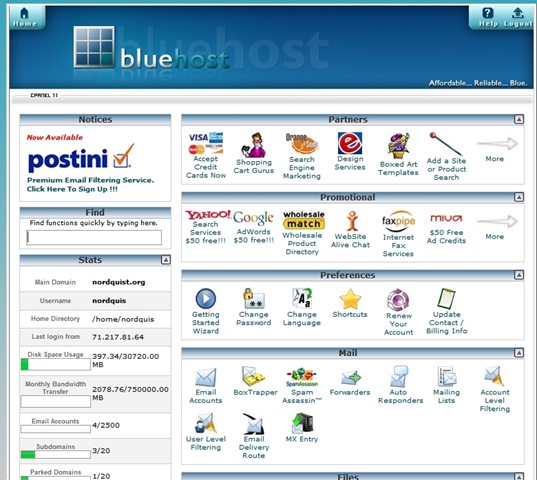
CPanel is the place you go to install WordPress along with keeping tabs on your site and a bunch of other stuff related to your account. I’m assuming you’re using Bluehost but most hosts have similar looking control panels. Follow the link in the email you received that will also include a username and password. At Bluehost the login is in the upper right corner and it asks for your domain and your password. Type both in and you should be taken to the Control Panel which looks like this:

screen_2008-04-06 22.02.58

Install WordPress

Scroll down this page until you come to Simple Scripts or Fantastico De Luxe listed under the Software/Service area. Either of these will install WordPress, but I’m more familiar with Fantastico so I’ll use that. Click on Fantastico over on the left navigation. To the right now you should see a link named New Installation.  Click on that and you should see a form that looks like this:

screen_2008-04-06 22.07.12

If you want to install WordPress into the root of your domain so your site is accessible at www.yourdomain.com then select your domain from the Install on domain drop down list. If you want to install WordPress on a subdomain such as I’ve done (blog.nordquist.org) you’ll need to go back the Control Panel page and setup a subdomain under the Domains areas. Most people want their blog accessible off the root domain.

Under the Admin Access Data area create a username and password and write it down. If you don’t have this, you won’t be able to login to your blog. Again, make sure you write this down!

Under the Base Configuration area do the same. I just use admin as the username and a password I can remember.

You don’t have to fill out the Email Account Configuration area at this time. But if you know this information it doesn’t hurt to fill it out now.

Once you have this form filled out, click on the Install WordPress button at the bottom of the page. Fantastico will tell you if WordPress was installed correctly. If it does then you’re ready to login for the first time.

Login to WordPress for the First Time

This is the moment of truth. You will fire up your browser and go to http://yourdomain/wp-login.php where you’ll see the graphic below. If you don’t see this graphic it means WordPress was not install properly.

image

Using the username and password you selected in the previous step, login to WordPress. If you’re using version 2.5, you’ll see a screen that looks something like this:

screen_2008-04-06 22.21.38

Before I post anything I like to check to make sure WordPress has all my current information. Do this by clicking on Settings off to the far right and check to make sure everything looks OK under the General Settings area. Give your blog a Title and Tagline if you’d like. When you’re done, click on Save Changes at the bottom.

Now look over to the far right and click on Users. This is where you’ll setup accounts for those who will be posting articles on your blog. Since I’m the only person who does that on my blog, I setup an account for Brett Nordquist. You’ll need to remember the username and password for this account as well. If you want to login as this new users you’ll need to logout first using the link in the upper right corner.

I suggest looking around the rest of the admin area. Once you’re ready to post you can do so by clicking the Write link in the admin or use a product like Windows Live Writer that acts like a word processor that posts to WordPress.

Themes and Plugins

Easily one of the coolest features of WordPress is the way you can easily change the look of your site by installing themes. There are thousands of available themes you can install for free.  You can also add additional features to your blog by installing plugins. An example of a plugin on my blog is one that pulls pictures from Flickr and displays them in the sidebar. Most plugins and themes are free to use.

Check out this post and this post for a few of my favorite theme collections. My only suggestion when it comes to themes is to keep it simple. The best themes I’ve used are the ones that don’t try to do too much. Try a single column theme instead of one with three or four columns if you’re just starting out as it will make editing the theme a lot easier.

screen_2008-04-06 23.13.47

I don’t spend a lot of time searching for plugins but I do run a few that add features to my blog that I find helpful. A few of my favorites are Flickr Badge, Google Sitemap, SRG Clean Archives, and Post Views.

FTP Recommendation

Once you’ve found a few themes or plugins you’d like to try, you’ll need a way of getting those files onto your server. There are a number of ways to do this but I’ve found that using an FTP client is the most reliable way to do this. Mosey on over to this page and grab the best FTP client around. It’s called FileZilla and it’s free to boot!

Once you’ve installed FileZilla, launch it and look for the host, username and password in the upper menu bar. In the HOST area you’ll type ftp.yourname.com along with the username and password you used to login to Control Panel. Then click on the Quickconnect button and you should see something like this if you’ve successfully logged in:

screen_2008-04-06 23.08.28

Look for the directory named wp-content and double click on it. Any new plugins you’ll need to upload into the plugins directory. Any new themes should be uploaded to the themes directory. Makes sure you read any instructions that came with the plugins and themes.

I suggest keeping your plugins to a minimum for a while but testing a number of themes until you find one that suits your fancy. Switching between themes it done in the admin area of your blog under the Design section. Once you see a preview of a new theme you’d like to try, just click on the picture and it’s done. Any plugins you upload will need to be activated by going to the Plugin area. Once activated your plugins are ready to go.

Well, those are the basic steps to get up and running with WordPress. If you have questions or suggestion feel free to use the comment section. What other suggestions would you have for those looking at using WordPress for the first time? I’m interested to hear what other reliable hosting companies you’ve found.

Moving In the Right Direction

I should have known that watching my 5-year old son play in his second soccer game was going to be interesting when, on the way to game, he told me The best part of the game is getting MY OWN water bottle”. About 5 minutes later he revised that statement by proclaiming The best part of the game is getting to wear MY OWN uniform”. And I’m certain, had the ride taken any longer, this would have continued.

Coaching a group of 5-year olds must feel comparable to trying to capture three dozen superballs that just dropped off your kitchen counter.  Their bounce is unpredictable, they’re elusive, and their sheer numbers wear you down.

soccerlincoln

Lincoln’s team is made up of three boys and one girl. The girl was the only player who seemed to realize that a soccer game was taking place. One boy wandered over to the sideline of the opposing team and struck up a conversation with anyone who would listen. Another boy was kicking the ball towards the goal when a ladybug landed on his jersey which suddenly became  a lot more interesting than the game. When his hat wasn’t pulled over his eyes, my son got in a few good kicks, some of which, were booted in the right direction. During halftime, one of boys excitedly ran up to his dad and said, “I think I’m sweating!!”

The coach spends most of his time getting the kids moving in the right direction. Good things happen when everyone is moving in the right direction. Kicking the ball into the goal is almost an afterthought with this group. The kids are most excited about the pre-game jumping jacks, the orange slices at half time and the water bottle at game’s end. Oh, and I can’t forget how “cool” it looks if one ends up with a little mud on the uniform. Nothing tells your sister how hard you played like mud on the uniform.

I loaded Lincoln and Anna in the car after stopping for lunch. As we drove home Lincoln said, “Dad, do you know what’s the best part of the game?” I replied that I wasn’t sure so maybe he should tell me. “The best part is when you take us to McDonalds and I get my OWN ROOTBEER”.

The pretty much puts today’s game in perspective.

Technorati Tags:

ThreatFire Protection

I came across a review for ThreatFire in the latest edition of Maximum PC which named it one of nine winners of their “Kick Ass” software awards. ThreatFire is an anti-virus program, but it instead of only being able to protect against known viruses and malware, it looks for malicious behavior making it effective against many “zero-day” exploits.  

screen_2008-04-05 11.26.59

I’ve installed ThreatFire on my three computers at home. It’s small footprint and easy installation routine make it simple enough for anyone to use. When ThreatFire notices potential malicious behavior it pops up a warning giving you the chance to shut the program down or allow it to continue. When I opened Outlook, ThreatFire noticed a plugin (Xobni) was attempting to access my .PST file and notified me.

I figured it would be a good idea to install ThreatFire on my kids computer which I did. But I think it’s just as valuable on Kim’s and my mine. Going forward, I will run ThreatFire and ETrust together.

Link to ThreatFire download

Technorati Tags: , , ,

Dominos Pizza Tracker

I’m tending our 4 kids tonight while Kim is out on the town with some friends. I didn’t feel like opening a can of chili so I decided to hit the Domino’s website and order a couple of pizzas.

When I finished my order I was taken to a screen called the PIZZA TRACKER where I could keep an eye on my pizzas as they rolled down the assembly line. I’ve heard of car companies who do this which makes sense when you’ve placed an order for an expensive item. But a fricking pizza?

I figured maybe this tracker would pacify my kids and keep them from asking WHENSTHEPIZZAGONNABEHERE. I moved the tracker page over to my 2nd monitor and caught myself watching it as intently as my kids. I could see that “Vicki” prepped and baked my pizzas. Someone named Eric boxed and was set to deliver them to me.

screen_2008-04-04 17.05.41

About 15 minutes later the doorbell rang. I opened it and said, “Hey Eric, do you have our pizzas?”. Eric didn’t see the humor in my comment but I made up for it with a big tip.

Initially, I wasn’t sure about the usefulness of the Pizza Tracker. But after one use, I’m convinced I should be able to track everything I order online in real time.

Damp Hair Hugs

The time just before the kids go to bed are some of the most hectic, loud, pull-your-hair-out-wanna-scream minutes of the day. At least one person is crying while another is running around the house naked. And that’s just the parents.

My goal at this point is to settle the kids down enough where I can catch them two at a time and fling them over my shoulder like sacks of potatoes. Then I make a beeline for their rooms before they can escape my grasp or give me a wet willie. 

One after another, each child is delivered to his or her bed where the next escape can be plotted. We say prayers, give hugs, and an occasional high five before I retreat to my computer in the basement to recover from the ordeal.

 HP2Q9366

Yet I know what’s coming. As much as I’d like to think I did an admirable job of tucking them into bed I know that Luca is quietly tip toeing down the stairs. She’ll come up behind me and ask for one last hug. She wrap her hands around my neck while her cute, blonde and damp hair smacks me in the face.

Damp hair hugs from my 7 year old daughter. Best part of the day? You bet.

Technorati Tags:

Saying No

This month’s Fortune Magazine has an interview with Apple CEO, Steve Jobs, who’s company Fortune named the most innovative in the same issue. Jobs is a master at answering the question he wish had been asked. But this time he kept on topic and gave direct answers most of the time. One idea he mentioned struck a chord when he discussed where where Apple places its focus:

People think focus means saying yes to the thing you’ve got to focus on. But that’s not what it means at all. It means saying no to the hundred other good ideas that there are. You have to pick carefully. I’m actually as proud of many of the things we haven’t done as the things we have done.

As the company I work for makes a play into new opportunities, I’m left to wonder if that’s such a good idea. It’s tempting to run after the new technology and convince yourself that gaining "first mover advantage" is worth the investment and risks. It had better be something where we can not just be a player, but be the best. Otherwise, we’ll be mediocre players in many markets. Boring.

Apple knows what it does well and it executes near flawless campaigns that ignite consumer passion and excitement. They don’t make dozens of computer models like Dell or HP. They don’t feel they have to be involved in every single software and service niche like Microsoft does. They aren’t trying to be all things to all people. They are focused on those products where they shine brightest. What they end up with are iconic products like the iPod which kick ass and take names.

Where does your company focus it’s people and investments? Does it know what it does better than anyone else?

Link to Jobs interview

Technorati Tags: ,,,

When Your Dad Is The Coach

“NOW PLAY SOME DEFENSE!!” the dad yelled as his 14 year old son ran down the court after hitting a three point shot to tie the game. I sat on the sideline watching this boy’s face turn from jubilation to sadness. The excitement of the shot he’d just nailed was wiped off his face as fast as it took the ball to swish through the net. No matter what this boy did his father was there to point out what he’d done wrong.

Watching this father coach his son by tearing into his every wrong move brought back a flood of memories. I know this boy’s father who is the basketball coach at a local high school. He’s a good man. So is my father who was a high school coach for many years and coached me in basketball, baseball and football. But I can relate to how this boy felt tonight because I’ve been in that same situation a few times. Like the time I played my first football game in 9th grade. I caught the only touchdown our team scored and was so excited to tell my dad who wasn’t able to watch the game. He picked me up from the game and when we got to the car he turned to me and said, “Coach said you played poorly on defense”. Excitement dashed. Touchdown forgotten.

When your father is the coach you’re expected to be a good athlete. I was able to get into the school gym to practice any weekend I wanted. My dad would spend hours working on my shot, tossing baseballs and footballs so I could improve my skills. For that I’m very grateful because I know he made me a better athlete which lead to earning an athletic and scholastic scholarship to college. I knew I had to be better than my competition or my dad would start the other player. He was careful not to play favorites when it came to starting games and playing time.

But there are downsides. By far the toughest part to manage was the coaching didn’t end when the buzzer sounded or the last out was recorded. In fact, most of my coaching took place at the dinner table. When I played a good game, the meal was enjoyable. When I didn’t play well, I just wanted to be left alone. I know my father meant well. He wanted me to reach my full potential just like his dad demanded of him. To his credit, he backed off me as I matured and moved onto the varsity teams.

I have a good relationship with my father today. As good as it’s ever been. The good times we had in athletics together far outweigh the challenges we had. As my children begin to play sports I continually remind myself that how I react to their performance can have a lasting impact on how much enjoyment they derive from the experience. Watching Luca play soccer last year, Kim had to remind me to chill out a number of times as I yelled for my daughter to be more aggressive with the ball.

One of my goals as a father is to find the positive is my children’s performances. Be it sports or music or school or whatever.Even if they misjudge a pop fly or miss open shots or play the wrong key, I can encourage my kids by searching for the good. Even if that means saying, “Hey, you really hustled out there today. Great job.” I don’t want to be like the mom in American Beauty who, after watching her daughter perform cheers tells her, “You didn’t screw up once!”

I recall a time when our basketball team was playing in the state tournament. We played the first half very tight. Our shots weren’t falling and we all hung a heads as we filed into the locker room. My father sensed the tension and the pressure we’d placed on ourselves. He ended that half time discussion by saying, “You’re not making a million dollars to play basketball. Let’s go out and have fun because that’s what it’s all about”.

That’s great advice I need to remember as my kids pass through the inevitable ups and downs of athletics. And life.