Earning My Business with Kindness

Across the street from my office is a small teriyaki shop. There’s nothing special about its appearance. The decor is bland, the menu is hand written on a white board and their service is slow at best. I’ve been ordering the “all white meat teriyaki with a little spiciness” for nearly five years and I’ve only seen one woman (the owner) working the cash register. There must be someone else behind the curtain making the food but I’ve never seen any one.

Last week I stopped in for lunch. As I walked up to the counter the owner stepped up to the register and said, “How are you doing Brett? I’ve not seen you in a long time”. I chatted with her for a bit. She asked how Kim and my kids were doing and was genuinely interested in them. She asked if I wanted my regular order, took my money and gave me a number that she’s never once called.

So I’m eating lunch at this small, unassuming joint yet I’m treated like my business really means something. I’m never taken for granted. Every visit I’m asked how things are going. She even remembers the ages of my kids and asks how they are doing. Once my order is ready, she places it in a bag along with a set of chop sticks and some napkins. She then takes the bag and ties a knot with the handles before handing it to me. She’s kind and gentle and I enjoy her company. I always walk out the door with a smile on my face. How many places can you say that about?

I contrast this relationship with the one I had last year with Sprint. I averaged a $200/month bill with Sprint for over five years. Yet when I called to cancel my contract to move to Verizon (only Verizon provides decent coverage at my house) I was put on hold, transferred around the horn, and basically tossed around like a rag doll. One night, after spending nearly an hour on the phone, one customer service rep told me her shift was ending and there wasn’t anyone else in her department to help me. Her suggestion? “Call back tomorrow when we’re open”.

I had met my contract obligations yet was told my service could only be canceled at the end of the billing cycle which meant I’d have to call back ON THAT VERY DAY or I’d have to wait yet another month. Let me get this straight: a company that can meter calls to the very second can’t figure out how to cancel my service on a date in the future? Sprint figures many people will give up if they put up enough obstacles. Their goal is to wear you down like a fish on the line until you’re so drained they can reel you with ease.

Why does a business where I spent eight bucks on teriyaki every few weeks treat me so much better than one where I’ve spent over $10,000?

I wish all businesses appreciated my patronage as much as the little teriyaki joint does.

Technorati Tags: ,

Uncomfortable Call

Those who know me are familiar with my disdain for the telephone. It’s a device I can’t stand because of how it disrupts our lives.

So I was thinking about why I dislike phones so much and then I remembered this job I had one summer while in college. I worked for a company that sold life insurance policies and burial insurance for seniors. I was a data entry rat who typed records into a very old computer. Sometimes, with supervisor approval, I could print stuff too. Man, those were exiting times.

I became so proficient at typing and printing that I was promoted to the resolution division. Here my job was to call life insurance policy holders whenever issues arose with their account. I learned very quickly that many calls were a bit awkward. I’d make the call, someone would answer and I’d ask to speak with the policy holder. Long pause………..

Finally the person would say, “I’m sorry but he died last month”.

I don’t know how many time this happened but at least a couple times a week. I never knew how to respond. I’d offer my condolences, but I always felt terrible. Sometimes I’d call the spouse of the person who had passed away, and it would set off a stream of painful emotions. When that happened, I’d leave my cubicle and head down to the exercise room and jump on the Stair Master to gather myself.

I was in the best shape of my life that summer.

Technorati Tags:

Two Huge Hairy Tarantulas

We do our best to get our kids to bed at a reasonable hour. Plans are made and intentions are well placed. But the wild card to the equation are the kids. One would assume spending an entire afternoon running around the zoo would wear a young body out making bedtime a welcome hour.

Wrong. Very wrong.

Even the very definition of bedtime has changed with each child. When the first child arrived, bedtime meant our daughter was asleep by 8:30. By the time child number four arrived, bedtime means we can locate three of four kids within our zip code.

So when the parents are more exhausted than the kids a plan must be hatched in order to keep the kids in their beds. We’ve tried bribes and threats with little success. Sometimes I’d tell a story which would work if the story lasted long enough to bore the kids to sleep. But lately even that hasn’t worked well.

image

But I came across something this weekend that worked well. When I say it worked well, I mean it kept the kids from running up the down the stairs asking us questions like, "Can I play Nintendo tomorrow after pre-school?" Basically, it keeps the kids in their beds. They’re still wide awake but they aren’t running through the kitchen looking for a snack. My secret has been to tell them a scary story. In the past I’ve told them about the Ghost outside the Window or the Goblin in the Chimney. Both kept the kids in their beds until Luca announced, "There’s no such thing as a ghost or goblin". What a lame dad!

She’s just too dang smart. So I had to concoct a more devious plan. I turn off all the lights and begin telling a story about three young kids who happen to be the same ages as our kids. They also live in the same color house and have a dog eerily similar to ours. Even the children’s names were similar. The story plods along until I explain how TWO HUGE, HAIRY TARANTULAS have taken up residence under their beds. Their eyes grow wide and I can see the wheels churning in their minds. Legs quickly stop dangling over the side of the bed and are placed under the covers and they snuggle up close to each other.

I’ll know the story has served it’s purpose when Lincoln asks, "How big are the Tarantula’s legs?" or "How hairy are his legs?"

"Huge and Very" I tell them as they all scoot towards to the middle of the bed. I then tuck each of them in bed. Luca wraps her arms around my neck and gives me a big kiss on the cheek. Lincoln wraps his arms and legs around me like a crab while Anna Lynn lures me in with open arms and, at the last second, tries to lick my ear.

Of course, there are no Tarantula’s where we live. I’m sure it won’t be long until Luca Google’s that fact and spoils the plan. Until then the Tarantula legend lives on. And those legs get huger and hairier with each telling.

Technorati Tags: ,,

WordPress 2.5 Problems

I’ve having two problems since I upgraded my blog to WordPress 2.5. The first problem is that some of my text widgets will disappear. To be more precise, the content in those text widgets will disappear when I add another a new text widget to my blog. This is annoying, but not a deal killer. 

But the biggest problem I’m having is that I can reorder my current widgets. When I add a newly activated widget to my current list, it puts it at the top of the list and I can’t drag it down to reorder.

Check out the the picture below. The Flickr Badge widget was the last one I added but I can’t move it further down the list. There is also something going on with the text overlapping the SAVE CHANGES button. I have to click in the lower left side of the button in order for it to save. This is a deal killer for me, and I may revert back to a previous version unless I can solve this.

I have the same problems with this screen whether I’m running Firefox 2 or IE 7. Has anyone else experienced this issue and were you able to fix it?

screen_2008-04-13 22.58.32

Watch Me Do This

“Hey, Dad, watch me do this”. I must hear that phrase at least twenty times a day. I hear it when my son wants me to watch him finish off the final monster in Zelda.  My youngest daughter will say it when she’s about to let loose an earth-shattering burp that’s entirely too loud for such a small body.

As I sat at the computer this weekend, I heard Luca open the front door and yell, “Hey, Dad, come watch me!!” So I headed for the front yard where I saw her doing this:

hula

One of our neighbors brought over a hula hoop and Luca decided to teach herself. She’s a perfectionist and possesses her father’s competitive nature. As she whipped the oversized hoop around her waist she said, “I can do it 40 times”. By the time Kim came outside to watch she was counting well into the two hundreds.

Children like to try new things. They aren’t afraid to fail. If the hoop falls, just pick it up and try again. This is what being a kid is all about. Learn something new and then show others what you’ve learned.

I’m aware of few “hula hoops” that I’ve kept from attempting because I’m afraid I’ll fail. I’ve wanted to try snow boarding for many years. Yet I recall how the first few times skiing I spent more time on my butt than on my skis and I don’t want to look stupid. I need to get over it and just try it.

Technorati Tags: ,

Woodland Park Zoo

We visited the Woodland Park Zoo near downtown Seattle this afternoon. The temperature was in the 70’s, the sky was clear and the sun felt great on my face.

We visited a number of the exhibits. The kids loved watching the howler monkeys climb up high in the trees and make goofy but very loud noises. My favorite exhibit was the birds of prey area. Several times during the day the zoo brings out a person to show and talk about the different birds. Today he brought a Peregrine Falcon. What an awesome bird! That tiny red spot near the falcon’s mouth is a piece of meat the handler had just given her.

image

Here’s what I learned about this magnificent bird:

  • It’s considered one of the best hunting birds if not the best.
  • It’s such a good hunter that eagles will follow it knowing it will catch prey.
  • It can kill and eat ducks.
  • It has an average wingspan of 45 inches.
  • It can reach speeds of 200 MPH while diving after prey

Watching today’s show made me want to return to learn about the other birds of prey. Well worth the visit, but call ahead to confirm exhibit times.

My Favorite Things To Do At the Grocery Store

  1. Sample every flavor of cashew in the bulk bin section.
  2. Locate the gallon of 1% milk with the latest expiration date by inserting my entire body into the cooler and reaching my hand back as far as it will go.
  3. Run down the soda aisle with my cart, hop on the back, and then coast down the straight-away until I run into a 24-pack of Diet Coke.
  4. Seeing how many items I can correctly ring up on self-service scanner before an attendant scolds me doing something wrong.
  5. Opening the freezer door near the ice cream that fogs up every door in the frozen foods section.
  6. Weighing items on the scales in the produce section that weren’t meant to be weighed like cartons of orange juice and Slim Jims.

No wonder Kim sends me to the store alone.

Technorati Tags:

Gartner States the Obvious

Gartner recently released a report that centered around the many challenges facing Microsoft Windows. Their conclusion will not surprise anyone who runs the bloated Vista: Windows is collapsing under it’s own weight and is need of drastic change.

image

Only Captain Obvious himself, Ric Romero, could be proud of this conclusion. The report chides Microsoft for trying to be everything to everyone and makes some suggestions for fixing the problem before Microsoft ceases to be relevant. Here are a few of their suggestions:

  1. Windows should be able to be tailored to specific applications
  2. Better security
  3. Make migration to new versions easier
  4. Simplify licensing to focus on specific devices

None of those suggestions tackle my primary gripe with Windows: Performance and stability degrade the longer one runs it. Some people call this “Windows rot”. I shouldn’t have to run a toolbox full of utilities to fix problems Windows causes. I’ve been running a fresh install of Windows XP on my current dual core machine for about 6 months. It started out running quite well, but each week, it takes longer to boot, applications take longer to load and the general experience deteriorates into a routine of frustration. Why should anyone have to spend a day rebuilding his or her machine just to get it back in working order?

When Gates announced the plan to get Windows 7 out the door by next year that effectively froze many corporate IT departments and their decision to upgrade to Vista. Why spend a year upgrading hardware and testing Vista when the next version is only a year away?

My suggestion to Microsoft would be to start from scratch and build a very scaled down OS that works well with the web. Make it modular so I can select or remove any applications. I never use Windows Media Player or Internet Explorer so why should I be forced to install either? Make it fast and stable and fire whoever decided UAC was a good idea. Stop gouging people $250 for the best version. Take a page from Apple’s book and make one version. Make it self healing. When a problem occurs, don’t make me Google for the solution. Don’t tie it to your other properties like Live Search, Spaces or Passport. Windows should be a Gateway to everything else but not get in the way when I want to use non Microsoft product. The web gives me this agnostic experience.

Then again, does it really matter what the next version of Windows looks like? If I’m able to run the majority of my applications from the web then a browser running on top of a small, fast, scaled down OS is all one really needs.

This is how things will work. Microsoft can either adapt to these changes or fade away into oblivion.

Technorati Tags: , , ,

Dumb Signs

I love dumb signs. I mean, I really love dumb signs that are put up to discourage bad behavior. I find it curious that someone believes that another person will change their behavior just because a sign orders or threatens them to do so. Well, here’s a message for all you sign makers out there: It doesn’t work. Step away from the fat black Sharpie. Signs don’t work on people who exhibit bad behavior in the first place.

Dumb signs reach the wrong audience. They only reach those people who wouldn’t do what the sign warns them of in the first place. Like the sign on all new iPods that says, “Don’t pirate music“. Man, I’ll bet that little sticker tugs at the heart strings and stops those bad pirates in their tracks. Or how about the sign above the men’s urinal at a company I used to work for that said, “Do not post signs above the urinal. Signed, Building Mgmt”. A few days later some jokester posted a sign that read, “Do not post signs above existing signs above the urinal. Signed, The Urinal Hero” That right there is my all-time favorite sign.

So I get a kick out of coming across dumb signs like I did tonight as I drove through the Arby’s drive-thru. Quick topic change. Have you ever tried to order JUST A SANDWICH off the Arby’s menu? It’s nearly impossible. The person taking the order must be working off some spiff program because they jump into action trying to shove a combo meal down your throat. They can’t imagine anyone would decline fries and drink with the sandwich. Next time I’m there, I’m going to order a sandwich and then forcefully decline the combo meal pitch. Then I’m going to order a stand alone order of fries. You just know the order taker is gonna throw a hissy about this time and attempt a drink upsell. I’ll decline that. When I’m asked if that’s all I need I’ll pause and say, “You know what? I’ll take a medium Diet Pepsi”. It will be a combo meal the old fashioned way.

OK, so back to the sign. As I drove up to the window to pick up my hard fought sandwiches, I noticed the following hand-written, ALL CAPS sign posted right near the window for every drive-thru customer to see:

ALICIA’S MANAGER KEYS HAVE SUPPOSEDLY DISAPPEARED. THIS WILL RESULT IN TERMINATION! HOPEFULLY THESE KEYS WILL MYSTERIOUSLY SHOW UP IN THE CUP ON THE COUNTER.

Upon reading this sign my first thought was, “Well crap, Arby’s hired a thief”. If this person would steal from a colleague, wouldn’t it make sense they would steal from a customer too? My second thought was, “Putting them in a cup on the counter might not be the most secure option given the circumstances”.

I’m sure Alicia is upset about her missing keys. I’m just not sure every person that pulls up to the drive-thru needs to read about it. And honestly, if you took the keys even by accident, would you return them with the threat of TERMINATION looming? I love the exclamation point after TERMINATION too. Nice touch.

I picked up my sandwiches, looked to make sure my keys were still in the ignition and drove home with more questions than answers.

Technorati Tags: , , ,

Getting Started With WordPress

A number of friends and coworkers along with a few people who read my blog have asked for help in starting a blog. Most questions centered around what blogging platform and hosting company to use. I used to tell most of these people to take a look at Blogger and Windows Live Spaces. If they were geeks, I’d tell them to roll their own blog and install WordPress on their own domain. But I was hesitant to suggest that to everyone because I knew I’d be called on to provide tech support when they got stuck.

But over the past couple years or so it’s become easier for the less technically inclined to use WordPress. I’ll get into the reasons for this later, but if you’re reasonably comfortable using an FTP program you’ll have no problems getting up and running with WordPress. The installation and administration of is handled by a slick, easy to use web-based interface. Really, there’s nothing to be afraid of.

WordPress is a fantastic blogging platform for many reasons but a few of my favorites include it’s stability, ease of use and plugin and theme architecture. With plugins and themes, it’s easy to change the look of your blog and give it additional functionality without having to know how to program.

So here are the steps to getting up and running with WordPress. This assumes you want to run WordPress on an existing domain or register your own.

Select A Hosting Company

This is the most important decision you’ll make. A bad host will lead to lots of downtown and poor service and support while a good host will make the experience go smoothly. I’ve run WordPress on six different hosts and I can only recommend two of them: Pair and Bluehost. (Note: If you find this article helpful, you can help support me by signing up with Bluehost through the links found here. If you don’t that’s cool too) Both Pair and Bluehost are top notch hosting companies with excellent support and products. As with many services, you get what you pay for. You’ll find cheaper hosting companies but you won’t care that you saved two bucks a month when you’re blog is frequently down. I’m sure there are other good hosting companies, but I’m only going to recommend the two I’ve used for years and that I know you’ll be happy with. Having said that, Bluehost is the best hosting company I’ve used hands down. They are an excellent choice for the noob as well as the web savvy veteran. I’m currently hosting four WordPress blogs from one account and was able to setup each with a single click using a cool feature called Fantastico. I don’t know if Pair uses this but I assume it does or something similar.

screen_2008-04-06 21.53.16

Login to CPanel

After you’ve selected a domain and signed up for a hosting service you should receive an email with the IP address of your website and instructions for logging into your CPanel (Control Panel) for the first time. (It may take a day or so for your domain to propagate out to the internet, but don’t be alarmed. You can still reach your site by IP address)

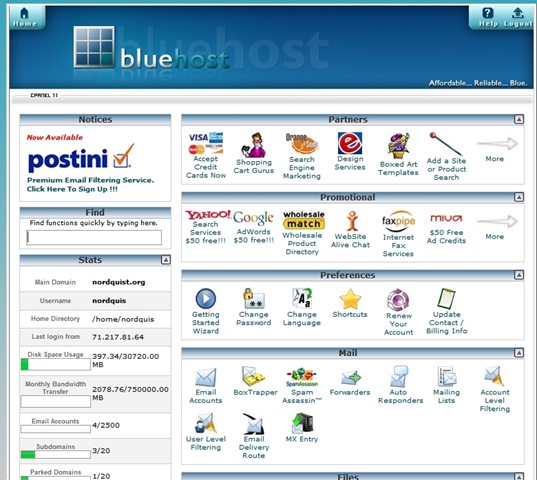
CPanel is the place you go to install WordPress along with keeping tabs on your site and a bunch of other stuff related to your account. I’m assuming you’re using Bluehost but most hosts have similar looking control panels. Follow the link in the email you received that will also include a username and password. At Bluehost the login is in the upper right corner and it asks for your domain and your password. Type both in and you should be taken to the Control Panel which looks like this:

screen_2008-04-06 22.02.58

Install WordPress

Scroll down this page until you come to Simple Scripts or Fantastico De Luxe listed under the Software/Service area. Either of these will install WordPress, but I’m more familiar with Fantastico so I’ll use that. Click on Fantastico over on the left navigation. To the right now you should see a link named New Installation.  Click on that and you should see a form that looks like this:

screen_2008-04-06 22.07.12

If you want to install WordPress into the root of your domain so your site is accessible at www.yourdomain.com then select your domain from the Install on domain drop down list. If you want to install WordPress on a subdomain such as I’ve done (blog.nordquist.org) you’ll need to go back the Control Panel page and setup a subdomain under the Domains areas. Most people want their blog accessible off the root domain.

Under the Admin Access Data area create a username and password and write it down. If you don’t have this, you won’t be able to login to your blog. Again, make sure you write this down!

Under the Base Configuration area do the same. I just use admin as the username and a password I can remember.

You don’t have to fill out the Email Account Configuration area at this time. But if you know this information it doesn’t hurt to fill it out now.

Once you have this form filled out, click on the Install WordPress button at the bottom of the page. Fantastico will tell you if WordPress was installed correctly. If it does then you’re ready to login for the first time.

Login to WordPress for the First Time

This is the moment of truth. You will fire up your browser and go to http://yourdomain/wp-login.php where you’ll see the graphic below. If you don’t see this graphic it means WordPress was not install properly.

image

Using the username and password you selected in the previous step, login to WordPress. If you’re using version 2.5, you’ll see a screen that looks something like this:

screen_2008-04-06 22.21.38

Before I post anything I like to check to make sure WordPress has all my current information. Do this by clicking on Settings off to the far right and check to make sure everything looks OK under the General Settings area. Give your blog a Title and Tagline if you’d like. When you’re done, click on Save Changes at the bottom.

Now look over to the far right and click on Users. This is where you’ll setup accounts for those who will be posting articles on your blog. Since I’m the only person who does that on my blog, I setup an account for Brett Nordquist. You’ll need to remember the username and password for this account as well. If you want to login as this new users you’ll need to logout first using the link in the upper right corner.

I suggest looking around the rest of the admin area. Once you’re ready to post you can do so by clicking the Write link in the admin or use a product like Windows Live Writer that acts like a word processor that posts to WordPress.

Themes and Plugins

Easily one of the coolest features of WordPress is the way you can easily change the look of your site by installing themes. There are thousands of available themes you can install for free.  You can also add additional features to your blog by installing plugins. An example of a plugin on my blog is one that pulls pictures from Flickr and displays them in the sidebar. Most plugins and themes are free to use.

Check out this post and this post for a few of my favorite theme collections. My only suggestion when it comes to themes is to keep it simple. The best themes I’ve used are the ones that don’t try to do too much. Try a single column theme instead of one with three or four columns if you’re just starting out as it will make editing the theme a lot easier.

screen_2008-04-06 23.13.47

I don’t spend a lot of time searching for plugins but I do run a few that add features to my blog that I find helpful. A few of my favorites are Flickr Badge, Google Sitemap, SRG Clean Archives, and Post Views.

FTP Recommendation

Once you’ve found a few themes or plugins you’d like to try, you’ll need a way of getting those files onto your server. There are a number of ways to do this but I’ve found that using an FTP client is the most reliable way to do this. Mosey on over to this page and grab the best FTP client around. It’s called FileZilla and it’s free to boot!

Once you’ve installed FileZilla, launch it and look for the host, username and password in the upper menu bar. In the HOST area you’ll type ftp.yourname.com along with the username and password you used to login to Control Panel. Then click on the Quickconnect button and you should see something like this if you’ve successfully logged in:

screen_2008-04-06 23.08.28

Look for the directory named wp-content and double click on it. Any new plugins you’ll need to upload into the plugins directory. Any new themes should be uploaded to the themes directory. Makes sure you read any instructions that came with the plugins and themes.

I suggest keeping your plugins to a minimum for a while but testing a number of themes until you find one that suits your fancy. Switching between themes it done in the admin area of your blog under the Design section. Once you see a preview of a new theme you’d like to try, just click on the picture and it’s done. Any plugins you upload will need to be activated by going to the Plugin area. Once activated your plugins are ready to go.

Well, those are the basic steps to get up and running with WordPress. If you have questions or suggestion feel free to use the comment section. What other suggestions would you have for those looking at using WordPress for the first time? I’m interested to hear what other reliable hosting companies you’ve found.