Testing Opera 9.5

I’ve been using the Opera 9.5 browser full time for two days now and am very impressed. It’s not that I’m tired of Firefox, but it’s become less stable for me over time, and I figured I’d give Opera a shot.

One thing is for certain: Opera feels substantially FASTER than IE 7 or Firefox 2. I don’t know how they do it but it accesses the browser cache so quickly it might just blow your mind. It feels very stable so far and is very simple to use. It’s scaled down UI reminds me a bit of IE 7 but it’s better organized.

Two features I really like are the integrated Bit Torrent support and a thing they call “Speed Dial”. When I open a new tab, a page pops up that shows thumbnails of the nice sites I visit the most often. Adding or removing pages from this page is very simple. This is a really great feature!

At this point I can’t say for certain that I’ll stick with Opera full time but it’s looking like a strong possibility. The only feature I’ve missed so far is the ability to load IE within an Opera tab like I an do with Firefox using IE Tab addon. If I can track down such a thing on Opera I’d be golden. My company email is on Microsoft Exchange so I use Outlook Web Access from home. Otherwise, I’d just uninstall IE…oh wait…it’s part of the OS, right? 🙂

screen_2007-10-26 22.52.11

Technorati Tags: , ,

How I keep my computer up-to-date

Every so often it’s not a bad practice to update your machine. Here’s my update to-do list in the order I prefer:

  1. Windows Update – To ensure you have the latest security fixes from Microsoft. Seems like there’s always a few. I’ve not had much luck updating device drivers here.
  2. Driver Agent – This is my preferred method for updating drivers. It’s not 100% correct but it covers most of the major devices.
  3. AppSnap – Up until this week, I’ve not come across an application that checks for application updates that’s either worked well or was accurate enough to recommend. But I’ve been impressed with this free program. I’ve tested it on two machines and it’s found a number of applications to update and has worked well doing so.

Here’s a picture of AppSnap running on my computer. It found three applications to update but wasn’t sure about Picasa. I let it update Picasa anyway it worked just fine.

screen_2007-10-14 21.39.49

Twitbin for Windows

My new Twitter app of the week is Twitbin. I’ve given up on Tweetr which is still the most elegant Twitter app I’ve tried, but it’s just too flaky to use each day.

So far I’m liking Twitbin quite a bit, especially the space it saves by integrating with Firefox. It does include a small ad at the bottom of the window but it’s not intrusive.

I wonder which browser will be the first to offer native Twitter integration?

Technorati Tags: , ,

The ultra dual monitor utility

I’ve been looking for the dual monitor utility that does exactly what I want it to do and this weekend I found it. It’s called Ultramon and I now consider it a must have utility for dual monitor users. It will be one of the first programs I install when I rebuild my computer every few weeks….oh wait…I’m not running Vista anymore. 🙂

I love how it allows me to configure each monitor independently. As you can see, I’m able to use a picture as wallpaper on each monitor. But the killer feature I’ve been looking for is how it manages open programs in the task bar. An open program will show up on that monitor’s task bar. You can even move program to the other monitor from the task bar.

screen_2007-09-16 21.43.56

In short, Ultramon does what I’ve been looking for. It has a ton of other nifty features. The only downside? It’s not freeware.

Here is an overview of its best features

Link to download 30 day trial version

Link to more in depth review from Digital Lifestyles

Technorati Tags: ,

Tweetr 2 freaks out

I used to recommend Tweetr to my friends who were getting started with Twitter. But ever since version 2 arrived, I’ve been telling them to look elsewhere. What started out as a good program has become less stable over time.

The screen below presents itself at least half a dozen times a day. I’ve experienced the same problem on my work computer. In order to get it working again, I press the OK button a few times and it goes back to normal. Sometimes the OK button positions itself in the far upper left corner where it can barely be reached.

What other Windows based Twitter apps should I consider? This is getting old.

screen_2007-09-16 20.11.06

Technorati Tags: ,

Motorola Q: Three month review

I’ve had my black Motorola Q for a few months and figured I’d revisit the review I wrote a while back. You can read my first impressions here, but keep in mind I’d only had the phone a few days.

Looking back to that first review the positive traits pretty much match up to my impressions today. The screen is quite nice, it’s relatively thin and easy to handle and it works well as an email platform with Exchange server report. Voice quality isn’t bad either.

moto-q-black-1 But the Q has one major problem I can’t overstate: it’s a terrible phone.

When people ask me how I like the Q I tell them that it makes a very good email and text device. It’s not bad at basic web browsing either. But if you’re looking for a great phone, this isn’t it.

What makes it a bad phone? The keys are just to dang small which leads to making numerous typing mistakes. I assumed the mistakes would decrease they longer I had the phone. Not a chance. With my old Motorola E815, I could input the numbers by feel. But the Q requires your utmost attention. And even then you’re likely to make mistakes. It’s an exercise in frustration. If the person you want to call is in your contact list or has called recently, it’s takes pressing a few buttons to make the call. But having to input the number manually is maddening.

I use the data features a lot more than I do the phone. Due mostly to my line of work, email is the preferred method of communication and the Q works quite well for that. I’m also to able to read my RSS feeds through Bloglines which is nice.

One other reason I stick with the Q is that someone at Microsoft wrote a fantastic traffic application. I don’t believe it’s available publicly so I can’t link to a download (here’s what it looks like), but it’s the best traffic application I’ve seen on a smartphone. Living about 25 mile south of Seattle and commuting into Redmond each day, I’ve come to rely on this nifty little application. I know there are web based product with similar functionality, but I like not having to launch my browser each time I want traffic updates.

So I can’t recommend the Q primarily as a phone. If you’re a data first, phone second kind of person, it may fit your needs though. If that’s the case it would help to have thin, nimble fingers.

Google vs. Microsoft Live Search Part 1

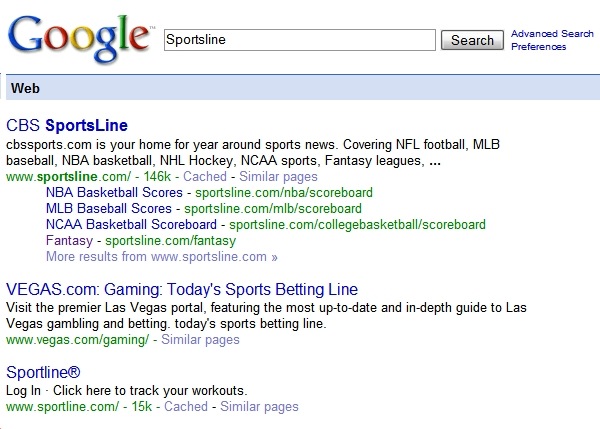
As more and more pages flood the net, it’s getting increasing difficult to find relevant search results within the first few results. I don’t have much patience when it comes to search. I expect to find what I’m after in the first 2 or 3 results or I try something else. I was reminded of this when I did a search this morning. I was looking for the Fantasy area of the Sportsline website so I went to Google and typed “Sportsline” and here are the first three results:

sportsline1

As you can see, Google organizes the different departments under the main search topic. In this case, it’s easy to see “Fantasy” listed under CBS Sportsline giving me the result I’m after.

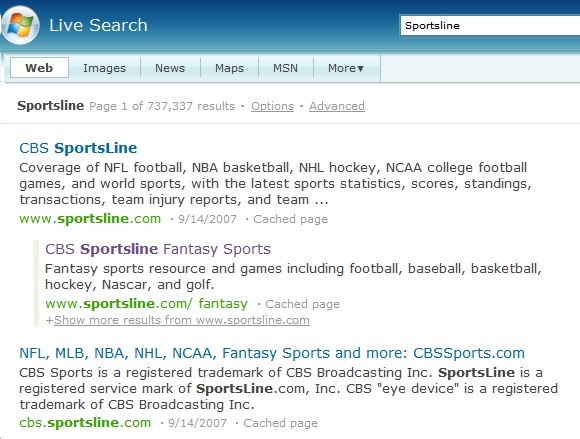
Here are the same results using Microsoft Live Search:

live1

You’ll notice that the first three results all go to the same site, CBS Sportsline, but the results are not as helpful at getting me to the right area. In fact, they are a bit confusing. It appears that the 2nd result is related to the first result which it is. Yet the third result looks like it should an entirely different website which it isn’t.

Google does a better job at getting me to the result faster. It’s similar to looking at a directory at a department store: Once I’m in the store, I go to the kids shoes or men’s department. If know the parent site, Google does a better job at getting me to the right area/department. Both do a good job at getting me to the parent site but so did Web Crawler and Alta Vista. Google has raised the stakes again.

Take a look at the following results and you’ll see what I mean:

  1. Search for “ESPN” at Google and Live – Google organizes the major areas (MLB, NBA, NFL) . Live keeps you searching down the list of results.
  2. Search for “Delta Airlines” at Google and Live – Google organizes Delta links under the main search term making it easy to navigate right to Flight schedules or Reservations. Live gets the main Delta site correct but isn’t much help after that. I’d have to click on that result and the click through the Delta site to get to the area I’m after.
  3. Search for “Nordstrom” at Google and Live – Both place ads up top but Live places 3 and Google places just one. This one isn’t even close. Look how well organized the Google results are compared to Live’s results where the first result links to a Nordstrom store in San Francisco. Huh? I live in Seattle. One thing I do like about the results on Live is the “related searches” selection on the far right.

Google generally does a better job at getting me to the result I’m after faster than anything else. Maybe this has something to do with the experience Google has gathered over the years. It has an uncanny way of determining what I’m after better than anything else.

Microsoft Live has a ways to go before I’d consider using it full time. Just getting me the parent site isn’t enough anymore.

How to find and download TV shows

Chris Soghoian wrote an excellent article over at cNet about how much easier it has become to download your favorite TV shows without the shackles of DRM.

I’ve been looking forward to watching season 2 of the IT Crowd that’s shown on the BBC. The first season was posted to the BBC website but they blocked US visitors from viewing which is so very absurd. I suppose this had something to do with the fact that NBC has licensed the show and plans to bring it US audiences this fall like the did with the Office.

But what if I want to watch the original episodes that aired on the BBC? I can’t buy them on iTunes. I can’t buy from off the BBC website. I can’t even purchase the DVDs. About all I can do is watch the low quality Flash versions on You Tube.

In the past I’ve searched Pirate Bay or MiniNova for single episodes. It’s not the best solution but was the only solution until I came across Soghoian’s article today. See his article for more details but my new way of getting the IT Crowd is the following:

  1. Download Miro which is sweet video player that supports BitTorrent and RSS. This allows you to subscribe to your favorite TV program and have it automatically downloaded to your computer when it becomes available.
  2. Once you have Miro installed, all you need is the RSS feed to the program you want to watch/download. You’ll find a huge number of TV feeds at tvRSS including the IT Crowd.
  3. Once you have the RSS feed, open Miro, go to Channel and add a new channel by giving it the RSS feed you found.

Here’s a picture of Miro grabbing IT Crowd episodes. Speeds vary but I’m usually able to download an episode in about one or two hours. Miro also plays most formats. You may never launch Windows Media Player again.

I’ll buy the DVDs like I did with The Office when was playing on the BBC and they only way to get it was by Bit Torrent until the DVDs arrived. BTW, the US version of The Office is great. But the BBC version is pure genius. There’s only one David Brent.

miro

Technorati Tags: , , ,

The Bridge

Kim and I watched a documentary called The Bridge tonight about people who decide to commit suicide by jumping from the Golden Gate Bridge in San Francisco. We’d seen a special on TV (20/20 or Dateline) a while back about the filming of this movie and why it was considered by many to be controversial. Although it was tough to watch in parts, it wasn’t as depressing as it may sound.

The director, Eric Steele, interviews the friends and family members of many of the people who decided to jump, including one young man who miraculously lived to explain his desire to die. As this boy jumped, he decided in midair that he wanted to live so he twists and contorts his body so that he’d hit the water feet first.

But the most dramatic footage comes from the multiple cameras Steele placed around the bridge that captured many of the jumpers in shots ranging from close ups to shots of distant shots where the sound of the splash tell us what just happened. A years worth of footage captured 23 people who jumped to their death.  This footage is so captivating and nerve wracking because, as it’s shown, you have no idea who is going to jump over the rail at any moment. The people come from all walks of life and it’s impossible to determine who the next victim is merely by what they are wearing or how they are carrying themselves.

We learn that the Golden Gate Bridge is the most popular suicide destination in the world with over 1300 confirmed deaths since it opened in 1937.

I visited the bridge with my parents when I was 12 years old. I recall sitting on a bus as we drove over the gigantic, golden span. The tour guide explained to us that only a handful of people had survived the jump. At the time I assumed people jumped for the thrill. It was chilling as a 12 year old to hear that and I felt a similar chill watching this movie tonight. It’s eerie. It’s disturbing. It’s honest. It’s not something I’ll soon forget.

File Hippo for easy program and driver updates

Chris Pirillo was talking about programs that take the headache out of updating program and drivers. I’ve tried a number of products including Driver Agent which will scan your installed drivers and tell you which could be updated. But it doesn’t check program versions and it costs $30/year. I tried it for a year and the time it saved me probably wasn’t worth the money.

Chris mentions a few similar products, but the best of the lot for Windows is File Hippo. It’s fast and free and scans both drivers and programs. It even tells you which are still in beta. Very cool, indeed!

Here is the scan it ran on my Windows XP system. I’ve only tried it on two computers but it looks like a keeper

filehippo